$20.28
Add to Cart
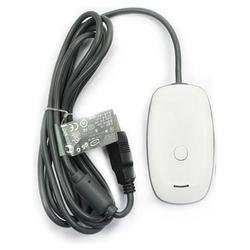
White Wireless Controller Adapter / Receiver For Xbox 360® to PC - Cable / Cord
More than 10 available, 172 sold
Details
Shipping: Australia: free (more destinations)
Sales Tax: check
Condition: Brand new
*The store has not been updated recently. You may want to contact the merchant to confirm the availability of the product.
White Wireless Gaming Adapter Cable / Cord For Xbox 360® Controller to PC / Mac (Requires Special Steps See Below)
Please Read All The Info Below
Get Three Get One No Charge
Specify The Color You Want After Checkout. Available in Black and White.
Features :
• 100% Brand New
• Converts RF Signal To Bluetooth On Mac®
• The Xbox 360® wireless controller might be the best game controller nowaday, and do you also want to use it with your PC games? With this receiver, you'll be able to connect your wireless Xbox 360® controller with your PC, and enjoy your PC games right away!
• Will work with future Xbox 360® Wireless Accessories.
• Provides up to a 30-foot range for complete wireless freedom.
• Use up to four Wireless Controllers and four Wireless Headsets simultaneously with one Wireless Gaming Receiver.
• Easily integrates with PC gaming scenarios and utilizes the same binding technology as Xbox 360®.
• Provides a great value by eliminating the need for additional accessories for Windows-based gaming at an attractive price point.
• Plugs into a PC USB port and has a six foot cable.
• Includes a six-foot USB cable
• Cable length: approx 1.8m
• Color: black, white, transparent color optional
• Dimension: 75*42*19mm
• Package dimension: 192*138*48mm
• Package weight: 130g
• Future drivers available for Windows Vista® and Force Feedback for the Wireless Racing Wheel. Package Info: 100% Brand New
• 1* PC Wireless Gaming Receiver for Xbox 360®
• 1* CD
• Colors are white and black (optional)
To use this receiver with Mac® watch this video
http://bit.ly/xbox360mac
And download the driver from this site:
http://bit.ly/osxdriver
Note: We are not responsible if the product does not work with Mac OSX®
*Shipping Info*
Item will be shipped by Airmail, delivery time is around 12 to 25 business days. We usually ship this item within 2 business days. Tracking # is delayed and does not correspond with the actual time the product is shipped.
**Shipping Times Are Delayed During Holiday Seasons**
All products have been checked and packaged in good condition. Use the Next and Previous Arrows to see more pictures of the product.
---------------------------------------------------------------------------------------------------------------
Detailed Installation Instructions:
Goto Updated Driver Wiki: http://wikidrivers.com/wiki/Microsoft_Xbox_360_Accessories
Windows® Drivers:
Windows® 7 (64-bit Only)
http://bit.ly/Win7_64
Windows® 7 (32-bit Only)
http://bit.ly/Win7_32
Windows Vista® (64-bit Only)
http://bit.ly/WVista_64
Windows Vista® (32-bit Only)
http://bit.ly/WVista_32
Windows® XP (64-bit Only)
http://bit.ly/XP_64
Windows® XP SP2 or Later (32-bit Only)
http://bit.ly/XP_SP2
If the Wireless Gaming Receiver for Xbox® is not recognized by the drivers, uninstall it and follow the directions below:
If your device is not recognized by the drivers you need to replace the xusb21.inf file in the appropriate drivers folder. You'll need to use WinRAR to extract the setup files from the Microsoft® exe file to access this folder. After you install WinRAR. Right click the driver setup exe file and select "Open with WinRar" and find the xusb21.inf file in the path below. Replace the xusb21.inf file with the one from the mediafire download link and install the drivers.
Folder Path (Choose Depending On Operating System)
~xbox360/setup/files/driver/vista_xp
~xbox360/setup/files/driver/win7
WinRar
http://www.rarlab.com/download.htm
xusb21.inf (This File Matches the Device ID with The Driver. If your device ID is PID_0291 it changes all references of PID_0719 to PID_0291 (Correct ID))
http://www.mediafire.com/?ix6tbibm1jdghr7
Windows® 7 Installation Instructions:
Install the appropriate drivers from your disk, or from the links above. Once it’s done installing, plug in your receiver. Windows® will say there are no drivers found for the device. With it still plugged in, go into your start menu and choose “Devices and Printers.” Scroll to the bottom of the page and you will see an unknown device, under the unspecified tab. Right click the icon and choose properties. Click the hardware tab and in the box there should be one option, double click it. Under the drivers tab click “update driver”. A window should pop up saying that there are no drivers, click “Browse my computer from driver software.” Then click “Let me click from a list of drivers on my computer.” Scroll down to the bottom of the list to find “Microsoft® Wireless Receiver for Windows® Version (Choose Latest Date)”. Click that option and then next. A warning will come up telling you that windows is not sure the are the right drivers. If you are sure you have the right ones click yes and you should be done. Your wireless receiver is now set up. Just link your controller to it and start playing some games.
Windows® 7 64bit Installation Instructions:
Step 1: Download the drivers
Step 2: Plug in your device (if it doesn't detect it right away, or if it shows up as unknown, proceed to step 3)
Step 3: Go to the device manager and update the driver manually using the following method:
a) Click update driver
b) Click Browse specific Location
c) Choose "let me pick..."
d) Find "Microsoft controllers..."
e) Choose 360 Wireless receiver for Windows® (8/13/09)
Step 4: Your receiver should light up properly now. Please attempt to connect the Wireless 360 Controller by hitting the guide button on the back.
Step 5: Once connected, you can verify the controller's buttons/axis sensitivity by going to "devices and printers"
Step 6: Play Games
Alternate Instructions Link:
http://support.microsoft.com/kb/933710
Wireless Gaming Receiver Work But Controller Not Connecting:
If your device is recognized by the computer but doesn't recognized the controller its most likely an issue of USB Power and not a problem with the Wireless Gaming Receiver. To fix this you need to use a USB bus that other devices are not drawing power from (try different USB slot)… or go the route of powered USB hub, or PCI usb card.
Last Resort Instructions:
Watch this video on how to fix internally
http://www.youtube.com/watch?v=U86kalOQdmE
Microsoft, Xbox, Xbox 360, Xbox LIVE, and the Xbox logos are trademarks of the Microsoft group of companies and are used under license from Microsoft. Windows Vista is either a registered trademark or trademark of Microsoft Corporation in the United States and/or other countries.
Please Read All The Info Below
Get Three Get One No Charge
Specify The Color You Want After Checkout. Available in Black and White.
Features :
• 100% Brand New
• Converts RF Signal To Bluetooth On Mac®
• The Xbox 360® wireless controller might be the best game controller nowaday, and do you also want to use it with your PC games? With this receiver, you'll be able to connect your wireless Xbox 360® controller with your PC, and enjoy your PC games right away!
• Will work with future Xbox 360® Wireless Accessories.
• Provides up to a 30-foot range for complete wireless freedom.
• Use up to four Wireless Controllers and four Wireless Headsets simultaneously with one Wireless Gaming Receiver.
• Easily integrates with PC gaming scenarios and utilizes the same binding technology as Xbox 360®.
• Provides a great value by eliminating the need for additional accessories for Windows-based gaming at an attractive price point.
• Plugs into a PC USB port and has a six foot cable.
• Includes a six-foot USB cable
• Cable length: approx 1.8m
• Color: black, white, transparent color optional
• Dimension: 75*42*19mm
• Package dimension: 192*138*48mm
• Package weight: 130g
• Future drivers available for Windows Vista® and Force Feedback for the Wireless Racing Wheel. Package Info: 100% Brand New
• 1* PC Wireless Gaming Receiver for Xbox 360®
• 1* CD
• Colors are white and black (optional)
To use this receiver with Mac® watch this video
http://bit.ly/xbox360mac
And download the driver from this site:
http://bit.ly/osxdriver
Note: We are not responsible if the product does not work with Mac OSX®
*Shipping Info*
Item will be shipped by Airmail, delivery time is around 12 to 25 business days. We usually ship this item within 2 business days. Tracking # is delayed and does not correspond with the actual time the product is shipped.
**Shipping Times Are Delayed During Holiday Seasons**
All products have been checked and packaged in good condition. Use the Next and Previous Arrows to see more pictures of the product.
---------------------------------------------------------------------------------------------------------------
Detailed Installation Instructions:
Goto Updated Driver Wiki: http://wikidrivers.com/wiki/Microsoft_Xbox_360_Accessories
Windows® Drivers:
Windows® 7 (64-bit Only)
http://bit.ly/Win7_64
Windows® 7 (32-bit Only)
http://bit.ly/Win7_32
Windows Vista® (64-bit Only)
http://bit.ly/WVista_64
Windows Vista® (32-bit Only)
http://bit.ly/WVista_32
Windows® XP (64-bit Only)
http://bit.ly/XP_64
Windows® XP SP2 or Later (32-bit Only)
http://bit.ly/XP_SP2
If the Wireless Gaming Receiver for Xbox® is not recognized by the drivers, uninstall it and follow the directions below:
If your device is not recognized by the drivers you need to replace the xusb21.inf file in the appropriate drivers folder. You'll need to use WinRAR to extract the setup files from the Microsoft® exe file to access this folder. After you install WinRAR. Right click the driver setup exe file and select "Open with WinRar" and find the xusb21.inf file in the path below. Replace the xusb21.inf file with the one from the mediafire download link and install the drivers.
Folder Path (Choose Depending On Operating System)
~xbox360/setup/files/driver/vista_xp
~xbox360/setup/files/driver/win7
WinRar
http://www.rarlab.com/download.htm
xusb21.inf (This File Matches the Device ID with The Driver. If your device ID is PID_0291 it changes all references of PID_0719 to PID_0291 (Correct ID))
http://www.mediafire.com/?ix6tbibm1jdghr7
Windows® 7 Installation Instructions:
Install the appropriate drivers from your disk, or from the links above. Once it’s done installing, plug in your receiver. Windows® will say there are no drivers found for the device. With it still plugged in, go into your start menu and choose “Devices and Printers.” Scroll to the bottom of the page and you will see an unknown device, under the unspecified tab. Right click the icon and choose properties. Click the hardware tab and in the box there should be one option, double click it. Under the drivers tab click “update driver”. A window should pop up saying that there are no drivers, click “Browse my computer from driver software.” Then click “Let me click from a list of drivers on my computer.” Scroll down to the bottom of the list to find “Microsoft® Wireless Receiver for Windows® Version (Choose Latest Date)”. Click that option and then next. A warning will come up telling you that windows is not sure the are the right drivers. If you are sure you have the right ones click yes and you should be done. Your wireless receiver is now set up. Just link your controller to it and start playing some games.
Windows® 7 64bit Installation Instructions:
Step 1: Download the drivers
Step 2: Plug in your device (if it doesn't detect it right away, or if it shows up as unknown, proceed to step 3)
Step 3: Go to the device manager and update the driver manually using the following method:
a) Click update driver
b) Click Browse specific Location
c) Choose "let me pick..."
d) Find "Microsoft controllers..."
e) Choose 360 Wireless receiver for Windows® (8/13/09)
Step 4: Your receiver should light up properly now. Please attempt to connect the Wireless 360 Controller by hitting the guide button on the back.
Step 5: Once connected, you can verify the controller's buttons/axis sensitivity by going to "devices and printers"
Step 6: Play Games
Alternate Instructions Link:
http://support.microsoft.com/kb/933710
Wireless Gaming Receiver Work But Controller Not Connecting:
If your device is recognized by the computer but doesn't recognized the controller its most likely an issue of USB Power and not a problem with the Wireless Gaming Receiver. To fix this you need to use a USB bus that other devices are not drawing power from (try different USB slot)… or go the route of powered USB hub, or PCI usb card.
Last Resort Instructions:
Watch this video on how to fix internally
http://www.youtube.com/watch?v=U86kalOQdmE
Microsoft, Xbox, Xbox 360, Xbox LIVE, and the Xbox logos are trademarks of the Microsoft group of companies and are used under license from Microsoft. Windows Vista is either a registered trademark or trademark of Microsoft Corporation in the United States and/or other countries.
You may also be interested in:
-
$33.44
-
$20.90
-
$19.50
-
$57.30
-
$19.50
-
$27.87
-
$26.47
-
$19.50
-
$19.50
-
$20.90