
$25.74
Add to Cart
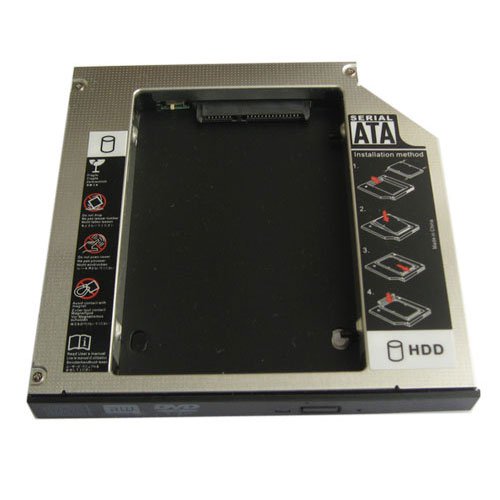
2nd SATA Hard Drive SSD Caddy for Dell Inspiron 15R N7520 replace GT80N dvd
More than 10 available
Details
Shipping: Australia: $792.00 (more destinations)
Condition: Brand new
Description:
Brand New Universal 12.7mm SATA to SATA 2nd HDD HARD DISK Drive Caddy
This SATA Hard Drive Caddy/Adapter/Bay fits following laptops:
Dell Inspiron 15R N7520
DELL XPS STUDIO 14 15 17 SERIES
Dell Studio 15, 17, 1537, 1737
Dell Studio 1435 1440 1457
Dell Studio 1735 1737 1745 1747
Dell Studio XPS 1640 1645
Dell Studio 1535 1536 1537 1555 1557 all use 12.7mm(Height) Slot Load SATA Drive
Dell XPS L502X L501X
Lenovo IdeaPad Y450 Y460 Y530
HP elitebook 8440, 8530p,8540p,HP EliteBook 6930p 8440p notebook PC',8440w,8530w,8540w,8730w,8740w,mobile workstation
HP Probook 4410s 4411s 4416s 4321s 4421s 4310s 4431s
Sony Viao F series, Such as VPCF112FX/B, VPCF11JFX/B, VPCF11MFX/B and VPCF1190X CTO,
Compaq Evo N200, N400c, N410c, N800c, N800v, N800w, N600c, N610c, N610v, N620c; M300, M700
Presario 2800
HP Business Notebook: NC6000 NC8000 NW8000,NX5000 Series
This item will replace the following drive DVD model number and increase your HDD volume by adding a 2nd HDD:
GSA-GT30L,GSA-T30N,GSA-T30L,GSA-T50N,GSA-T50L, TS-L633, GSA-GT20L UJ-875A,AD-7640S, GT80N etc DVD Burner drive.
SATA 2ND Hard Disk Drive HDD caddy/adapter for any other Dell Laptop that uses 12.7mm height DVD dirve with SATA connector to the motherboard. It work with SATA Hard drive, and SSD (Solid State Drive) as well.
Dimensions:128.0(W)mmx12.7(H)mmx129.0(D)mm
HDD Interface: SATA (2.5" sata or ssd drives).
Laptop/ Mother Board Interface: SATA
This item is come with a hdd caddy and a Universal faceplate,some laptops need to use the original dvd drive's bracket,and you can remove the faceplate to the caddy.
1. Fast & Reliable connection, just as the primary HDD
2. Fully integrated into laptop, no cables/PSU/software driver needed
3. Dual boot, Support installation of 2nd operating system on the 2nd HDD and boot selection.
Installation steps:
1. Unpack the hard drive, lift the hard drive dacaddy retaining latch, The screws to the hard drive.
2. Insert the hard drive into the hard drive caddy.
3. Slide the hard drive into the connector until it locks into place.
4. Lower the hard drive caddy retaining latch until it snaps closed.
Package Included:
SATA 2nd HDD Caddy for SATA notebook HDD (For 2.5" HDD,not include hard drive)
Brand New Universal 12.7mm SATA to SATA 2nd HDD HARD DISK Drive Caddy
This SATA Hard Drive Caddy/Adapter/Bay fits following laptops:
Dell Inspiron 15R N7520
DELL XPS STUDIO 14 15 17 SERIES
Dell Studio 15, 17, 1537, 1737
Dell Studio 1435 1440 1457
Dell Studio 1735 1737 1745 1747
Dell Studio XPS 1640 1645
Dell Studio 1535 1536 1537 1555 1557 all use 12.7mm(Height) Slot Load SATA Drive
Dell XPS L502X L501X
Lenovo IdeaPad Y450 Y460 Y530
HP elitebook 8440, 8530p,8540p,HP EliteBook 6930p 8440p notebook PC',8440w,8530w,8540w,8730w,8740w,mobile workstation
HP Probook 4410s 4411s 4416s 4321s 4421s 4310s 4431s
Sony Viao F series, Such as VPCF112FX/B, VPCF11JFX/B, VPCF11MFX/B and VPCF1190X CTO,
Compaq Evo N200, N400c, N410c, N800c, N800v, N800w, N600c, N610c, N610v, N620c; M300, M700
Presario 2800
HP Business Notebook: NC6000 NC8000 NW8000,NX5000 Series
This item will replace the following drive DVD model number and increase your HDD volume by adding a 2nd HDD:
GSA-GT30L,GSA-T30N,GSA-T30L,GSA-T50N,GSA-T50L, TS-L633, GSA-GT20L UJ-875A,AD-7640S, GT80N etc DVD Burner drive.
SATA 2ND Hard Disk Drive HDD caddy/adapter for any other Dell Laptop that uses 12.7mm height DVD dirve with SATA connector to the motherboard. It work with SATA Hard drive, and SSD (Solid State Drive) as well.
Dimensions:128.0(W)mmx12.7(H)mmx129.0(D)mm
HDD Interface: SATA (2.5" sata or ssd drives).
Laptop/ Mother Board Interface: SATA
This item is come with a hdd caddy and a Universal faceplate,some laptops need to use the original dvd drive's bracket,and you can remove the faceplate to the caddy.
1. Fast & Reliable connection, just as the primary HDD
2. Fully integrated into laptop, no cables/PSU/software driver needed
3. Dual boot, Support installation of 2nd operating system on the 2nd HDD and boot selection.
Installation steps:
1. Unpack the hard drive, lift the hard drive dacaddy retaining latch, The screws to the hard drive.
2. Insert the hard drive into the hard drive caddy.
3. Slide the hard drive into the connector until it locks into place.
4. Lower the hard drive caddy retaining latch until it snaps closed.
Package Included:
SATA 2nd HDD Caddy for SATA notebook HDD (For 2.5" HDD,not include hard drive)


 CN, Guangdong
