
$25.76
Add to Cart
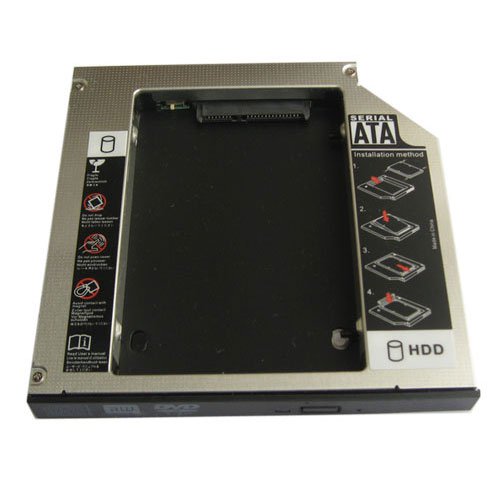
2nd SATA Hard Drive SSD Caddy for Acer Aspire 5749 5749G 5749Z 5749ZG
More than 10 available
Details
Shipping: Australia: $792.00 (more destinations)
Condition: Brand new
Description:
Brand New Universal 12.7mm Sata to Sata 2nd HDD HARD DISK DRIVE caddy for Acer Aspire 5749 5749z NEW
This SATA Hard Drive Caddy/Adapter/Bay fits following laptops:
Acer Aspire 5749 5749G 5749Z 5749ZG.
SATA 2ND Hard Disk Drive HDD caddy/adapter for any other Dell Laptop that uses 12.7mm height DVD dirve with SATA connector to the motherboard. It work with SATA Hard drive, and SSD (Solid State Drive) as well.
This item is come with a hdd caddy and a Universal faceplate,some laptops need to use the original dvd drive's bracket,and you can remove the faceplate to the caddy.
HDD Interface: SATA
Machine interface: SATA
1. Fast & Reliable connection, just as the primary HDD
2. Fully integrated into laptop, no cables/PSU/software driver needed
3. Dual boot, Support installation of 2nd operating system on the 2nd HDD and boot selection.
Installation steps:
1. Unpack the hard drive, lift the hard drive dacaddy retaining latch, The screws to the hard drive.
2. Insert the hard drive into the hard drive caddy.
3. Slide the hard drive into the connector until it locks into place.
4. Lower the hard drive caddy retaining latch until it snaps closed.
Package Included:
1 X SATA 2nd HDD Caddy for SATA notebook HDD (For 2.5" HDD,not include hard drive)
Brand New Universal 12.7mm Sata to Sata 2nd HDD HARD DISK DRIVE caddy for Acer Aspire 5749 5749z NEW
This SATA Hard Drive Caddy/Adapter/Bay fits following laptops:
Acer Aspire 5749 5749G 5749Z 5749ZG.
SATA 2ND Hard Disk Drive HDD caddy/adapter for any other Dell Laptop that uses 12.7mm height DVD dirve with SATA connector to the motherboard. It work with SATA Hard drive, and SSD (Solid State Drive) as well.
This item is come with a hdd caddy and a Universal faceplate,some laptops need to use the original dvd drive's bracket,and you can remove the faceplate to the caddy.
HDD Interface: SATA
Machine interface: SATA
1. Fast & Reliable connection, just as the primary HDD
2. Fully integrated into laptop, no cables/PSU/software driver needed
3. Dual boot, Support installation of 2nd operating system on the 2nd HDD and boot selection.
Installation steps:
1. Unpack the hard drive, lift the hard drive dacaddy retaining latch, The screws to the hard drive.
2. Insert the hard drive into the hard drive caddy.
3. Slide the hard drive into the connector until it locks into place.
4. Lower the hard drive caddy retaining latch until it snaps closed.
Package Included:
1 X SATA 2nd HDD Caddy for SATA notebook HDD (For 2.5" HDD,not include hard drive)


 CN, Guangdong
