$697.04
Add to Cart
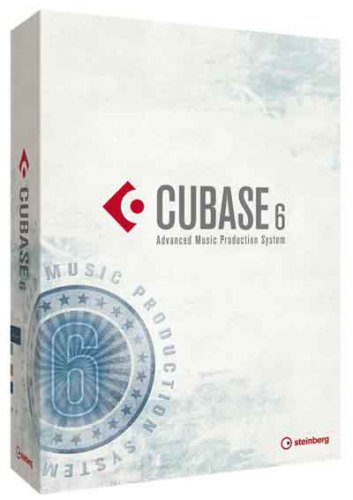
Cubase 6 Advanced Music Production Software
Only 1 available
Details
Shipping: USPS calculated - check
Condition: Brand new
*The store has not been updated recently. You may want to contact the merchant to confirm the availability of the product.
BUY * SELL * TRADEAuthorized DealerThis item ships FREE!Cubase 6 from Steinberg is a native music production system for Mac OS X and Windows 7. Like its past incarnations, the software combines full-featured audio and MIDI recording and editing, virtual instruments and powerful audio mixing, with the added flexibility of loop- and pattern-based arranging and mixing. Version 6 includes another round of significant new features and upgrades.The software places emphasis not only on technology and precision, but also on user friendliness, usability and ergonomics. With VST Expression 2, the company raises sequencer-based composing to a whole new level and offers an intuitive and functionally complete MIDI composing and sequencing toolset. VST Expression Maps allow for working with multiple instrument articulations (e.g. huge orchestra libraries) and introduces an editing concept that is user-customizable and fully integrated with the Key and Score Editors. Instead of handling all MIDI controllers for switching articulations, VST Expression Maps allow seamlessly and transparently integrated editing as well, as full control over multiple articulations. The software includes a huge set of VST MIDI plug-ins, creative tools, such as the drum step sequencer, the Beat Designer, a powerful arpeggiator, a MIDI pattern sequencer and a MIDI chord processor, and more. The Cubase Sample Editor allows for almost limitless creative freedom while editing audio with a full editing toolset that offers a huge range of functions. The list could go on and on. Instead, please refer to the feature set to get a complete overview of everything the software can do. Cubase 6 has taken the concept of a complete virtual studio (in the box) to levels that were only a dream a decade ago. The user only needs to supply a computer, an I/O interface and monitoring to have access to virtually every tool possible to create professional audio, including working with surround. What's New in Cubase 6 Drum Editing (Faster with Less Clicks) Intelligent Transient Detection Based on a state-of-the-art algorithmFinding all drum hits is easy with intuitive preview feature and two specialized filters, called Peak and Beats Detect single hits, rolls and ghost notes faster and more accurate than beforeAfter the transients have been detected they are merged across multiple tracks by taking user definable priority of individual tracks into account The drum hits are then cut up and grouped together ready for detailed tweaking - in this way, copying a great fill from verse 2 to verse 1 is solved with minimum effort - select one, move them allAdvanced Tempo DetectionNewly developed tempo detection algorithm, which accurately and semi-automatically determines the tempo of any rhythmic audio material, making it easy to determine the tempo of a drum performance that has not been recorded to a metronome The resulting tempo map can be used to keep the dynamic feeling of natural tempo variations or to remove unwanted tempo changes quickly Whatever rhythm is at hand, the software will detect the tempo and match the track to a beat grid of your choiceMulti-Track Audio QuantizationRhythmic audio material can be quantized just like any MIDI material, offering numerous possibilities to fix timing issues and to change the groove of live-recorded drums To preserve phase relationships between tracks, the individual slices on all tracks are still grouped and moved at onceCubase automatically creates cross-fades between slices to ensure seamless transitions between them and fill gaps that might be introduced during quantization A few clicks, and all drum tracks are matched to the bass drum, snare or whatever source or sources are desired With the Slice Rules you can decide which sources will get a higher priority during slicingStraightforward Drum ReplacementHitpoint-to-MIDI function makes it very easy to replace, double or enrich live-recorded drum sounds When the transients have been detected, a single click on the Create MIDI Notes button creates a MIDI track containing a MIDI note for each single drum hit It's then up to the user which sampler or synthesizer they want to fuel with the note - one choice could be the included Groove Agent ONE drum sampler Comp the Perfect Take Lane Track New Lane Track concept for lightning fast multi-take compositing When recording several takes, the software instantly creates a Lane Track for each takeSimply swipe across the best parts of a take and Cubase automatically creates a master take that contains all selected parts For comfortable compositing, each Lane Track sports a solo button and full editing functionality Track Grouping Track Edit Groups The Track Edit Groups tool refines working with multi-track recordings by allowing multi-track editing with single-click actions Whether it is guitar, bass or ambient recording, sound engineers mix several signals to get the best results (when recording a guitar for example, it is common to record signals from different amps or microphone types on separate tracks) With Track Edit Groups activated, related tracks are tied together and can be edited at once, making this feature a huge time-saver VST Expression 2 Maximum Expression on Every Note Assign, create and edit multiple controller values directly on single note-level, all in a single handy graphical interface The perfect choice for demanding orchestral arrangements and creating unique sound effects, Note Expression allows controller values to be drawn directly onto single note events in the Key Editor Because each individual note event contains its own set of controller data, even polyphonic sounding notes can now be dynamically controlled, fully independent from each other Composers can access controller information such as volume or pitch bend in one place, making it easy to scale, shift or delete several values at once When moving or copying a note event, the associated controller data will follow as well - each single note event and controllers are treated as one unit, which makes working with instrument articulations faster and more intuitiveBreaking the traditional MIDI limitations opens up entirely new creative possibilities - imagine a chord containing different filter sweeps, volume curves or dynamic expressions for every single note From ultra-realistic instrument sounds to the most unexpected sonic spheres, VST 3.5 and Note Expression enable a whole new creative approach to composition and sound design Use VariAudio together with Note Expression to bring lifeless MIDI recordings to life -with the Extract MIDI feature inside the Sample Editor the user can make snapshots of the pitch and volume curves of monophonic audio recordings and paste that information into MIDI notes DynamicsThe VST Expression set has been extended and now also sports dynamics in the Key Editor From pianissimo to crescendo and fortissimo, all dynamics from the Score Editor are available in the new Articulations/Dynamics Lane in the Key EditorWhen using VST 3.5-compatible instruments, instant acoustic feedback is available from parts that contain dynamics Dynamics Mapping feature allows very fine adjustments for up to three controllers for dynamics, including velocity, volume and freely assignable MIDI CCVST Expression MapVST 3.5 compatible instruments such as the included HALion Sonic SE, as well as HALion Sonic and the HALion Symphonic Orchestra VST Sound Instrument Set can automatically transfer the articulation setup of each individual instrument sound to a VST Expression Map, a function that will dramatically speed up the setup of VST Expression maps Processing and Instruments VST Amp Rack Featuring the best in convolution technology, VST Amp Rack delivers a comprehensive collection of outstanding guitar tones across an array of genres and styles, from vintage to modern, available with the simple push of a buttonBased on some of the finest guitar amplifiers ever created, the rack comes with 7 distinct amplifier models that exactly reproduce the unique character of their originals Whether it is clean, crunchy, or sustain, VST Amp Rack can delivers the perfect tone for studio-grade guitar tracksThe customizable guitar rack allows guitarists, bassists, engineers and producers to create complete setups, consisting of amplifiers, classic stomp box effects, speaker cabinets and microphone modelsSixteen legendary stomp boxes are available, including Wah Wah, Tape Delay and Fuzz, in combination with 6 classic speaker cabinets, 2 microphones, and a tuner HALion Sonic SEStreamlined version of HALion Sonic, Steinberg's premier VST workstationIncorporates the same pristine audio and synthesizer engine as its brother, offering tight integration with Cubase 6 and more than 900 production-ready sounds and instrumentsIntuitive handling, instant playability and VST 3.5 support make this new instrument the perfect choice for creative songwriting or just playing alongEquipped with detailed acoustic instruments and brilliant synthesizers, the SE version is an extensive pool of sounds for everyday studio workSupports VST 3.5 and benefits from VST Expression 2 technology, includes time-saving tools for composers such as the automatic VST Expression map setup and the Note Expression features Eight intuitive Quick Controls provide fast access to the most important sound-shaping parameters MIDI file import mode makes full use of HALion Sonic SE's 16-part multi-timbral modeHALion Symphonic Orchestra VST Sound Instrument SetContains a 60-day fully functional trial version of the HALion Symphonic Orchestra VST Sound Instrument Set, providing a wealth of acoustic orchestral instruments The trial version can be upgraded online to a permanent license at a very special price exclusively for Cu
You may also be interested in:
-
$41.75
-
$27.81
-
$41.75
-
$27.81
-
$41.75
-
$55.69
-
$41.75

-
$31.99

-
$27.81

-
$69.64