
$167.91
Add to Cart
16 Channel 60 FPS DVR PCI Video Capture Card GV-650
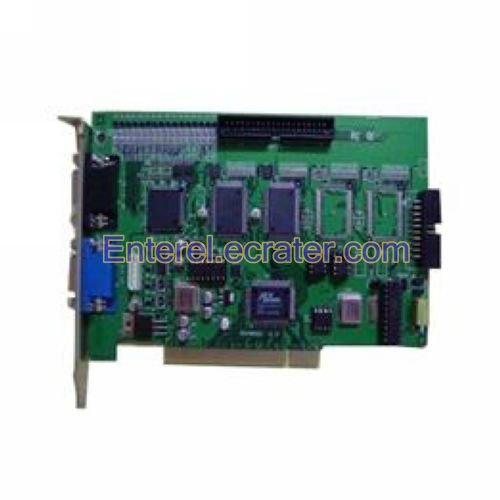


More than 10 available
Details
Shipping: Australia: free (more destinations)
Condition: Brand new
*The store has not been updated recently. You may want to contact the merchant to confirm the availability of the product.
Specifications:
o Input Type: D-Type: DB15 x 2
o Video Input(s): 4, 8, 12, 16 Cams
o Audio Input(s): 2 Channels , & 16CH(with GV-A16 board) is optional
o Recording Rate: 60 fps (NTSC), 50 fps (PAL)
o Display Rate: 60 fps (NTSC), 50 fps (PAL)
o Video Resolution: NTSC: 720 x 480pixel, 720 x 480pixel de-interlace, 720 x 240pixel, 640 x 480pixel, 640 x 480pixel de-interlace, 640 x 240pixel, 320 x 240pixel; PAL: 720 x 576pixel, 720 x 576pixel de-interlace, 720 x 288pixel, 640 x 480pixel, 640 x 480pixel de-interlace, 640 x 240pixel, 320 x 240pixel
o Compression Format: Wavelet, Mpeg-4, GeoMpeg-4
o GV-DSP Support: Yes
o GV-A16 Support: Yes
o GV-NET/IO Card Support: Yes
o Software: V8.0 / V7.05 / V6.1 / V6.05
o Dimension: New PCB(D-Type Ver7.05): 175 x 98mm / 6.9 x 3.9in; Old PCB(D-Type Ver6.1): 150 x 100mm / 5.9 x 3.9in
o OS Supported: Windows 2000 / Windows XP / Windows 2003
o CPU: Pentium 4 - 2.0 GHZ
o RAM: 256MB Minimum
o HDD: 80GB Recommended
o VGA: NVIDIA Geforce2 MX200 32MB
o DirectX: 9.0 or above
Details:
16 Channel 60 FPS DVR PCI Video Capture Card GV-650
o 16 Channel 60 FPS DVR PCI Video Capture Card GV-650
How to Select a Video Capture Card:
o Determine the type of PC expansion slot that you will plug your video capture card into your computer. The three major PC adapter interfaces for video capture cards are PCI, PCI-Express (or PCI-e), and USB. This is important because you will need to see which one will fit your PC. If you are not sure use the reference link at the end of this article to motherboards.org about PC Expansion Slots
o Determine the type of video format that the video capture card will be receiving. The two standard video formats are Standard Definition (SD) and High Definition (HD). Video capture cards vary in the types of definition as well as the format of HD content. Also some video capture cards do hardware encoding which formats the video content into PC readable files. Check if the video capture card is software or hardware encoding as this can affect your PC system resources such as CPU and Memory requirements
o Choose the number of tuners for the video capture card. Most of the early video capture cards could only capture one video source at a time. Now manufacturers sell dual tuners or multi-tuner video capture cards that allow more than one video source to capture per PC expansion slot.
o Other media type considerations. Some video capture cards can take FM audio signals which allow to capture streaming audio. Also another consideration are remote controls that allow to change channels with your video capture card. Make an assessment of all of your requirements before purchasing
Package Included:
o 1 x 16 Channel DVR PCI Video Capture Card
o Input Type: D-Type: DB15 x 2
o Video Input(s): 4, 8, 12, 16 Cams
o Audio Input(s): 2 Channels , & 16CH(with GV-A16 board) is optional
o Recording Rate: 60 fps (NTSC), 50 fps (PAL)
o Display Rate: 60 fps (NTSC), 50 fps (PAL)
o Video Resolution: NTSC: 720 x 480pixel, 720 x 480pixel de-interlace, 720 x 240pixel, 640 x 480pixel, 640 x 480pixel de-interlace, 640 x 240pixel, 320 x 240pixel; PAL: 720 x 576pixel, 720 x 576pixel de-interlace, 720 x 288pixel, 640 x 480pixel, 640 x 480pixel de-interlace, 640 x 240pixel, 320 x 240pixel
o Compression Format: Wavelet, Mpeg-4, GeoMpeg-4
o GV-DSP Support: Yes
o GV-A16 Support: Yes
o GV-NET/IO Card Support: Yes
o Software: V8.0 / V7.05 / V6.1 / V6.05
o Dimension: New PCB(D-Type Ver7.05): 175 x 98mm / 6.9 x 3.9in; Old PCB(D-Type Ver6.1): 150 x 100mm / 5.9 x 3.9in
o OS Supported: Windows 2000 / Windows XP / Windows 2003
o CPU: Pentium 4 - 2.0 GHZ
o RAM: 256MB Minimum
o HDD: 80GB Recommended
o VGA: NVIDIA Geforce2 MX200 32MB
o DirectX: 9.0 or above
Details:
16 Channel 60 FPS DVR PCI Video Capture Card GV-650
o 16 Channel 60 FPS DVR PCI Video Capture Card GV-650
How to Select a Video Capture Card:
o Determine the type of PC expansion slot that you will plug your video capture card into your computer. The three major PC adapter interfaces for video capture cards are PCI, PCI-Express (or PCI-e), and USB. This is important because you will need to see which one will fit your PC. If you are not sure use the reference link at the end of this article to motherboards.org about PC Expansion Slots
o Determine the type of video format that the video capture card will be receiving. The two standard video formats are Standard Definition (SD) and High Definition (HD). Video capture cards vary in the types of definition as well as the format of HD content. Also some video capture cards do hardware encoding which formats the video content into PC readable files. Check if the video capture card is software or hardware encoding as this can affect your PC system resources such as CPU and Memory requirements
o Choose the number of tuners for the video capture card. Most of the early video capture cards could only capture one video source at a time. Now manufacturers sell dual tuners or multi-tuner video capture cards that allow more than one video source to capture per PC expansion slot.
o Other media type considerations. Some video capture cards can take FM audio signals which allow to capture streaming audio. Also another consideration are remote controls that allow to change channels with your video capture card. Make an assessment of all of your requirements before purchasing
Package Included:
o 1 x 16 Channel DVR PCI Video Capture Card
You may also be interested in:
-
$0.75
-
$0.75
-
$137.09

-
$0.94
-
$1.88
-
$149.50

-
$4.49

-
$25.53
-
$19.52

-
$19.52



 CN, Guangdong
