
$108.05
Add to Cart
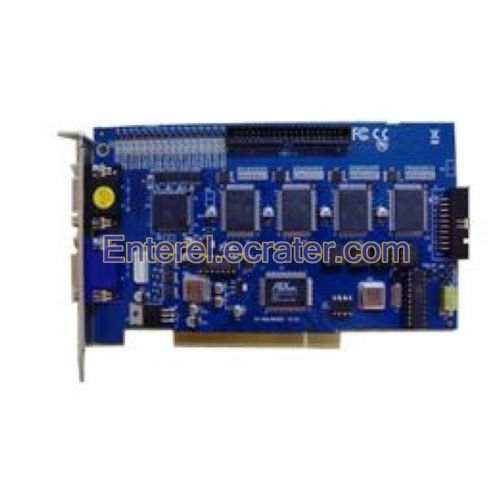
16 Channel 120 FPS DVR PCI Video Capture Card GV-800


More than 10 available, 40 sold
Details
Shipping: Australia: free (more destinations)
Condition: Brand new
*The store has not been updated recently. You may want to contact the merchant to confirm the availability of the product.
Specifications:
* Input Type: GV-800 D-TYPE:DB15 x 2
* Video Input(s): 4, 8, 12, 16 Cams
* Audio Input(s): 4 Channels
* Recording Rate: At 320 x 240 Resolution: 120 fps (NTSC), 100 fps (PAL).
* Display Rate: 120 fps (NTSC), 100 fps (PAL).
* Video Resolution: - NTSC/PAL: Full D1, Half D1, CIF
* Compression Format: Geo MPEG4, Geo MPEG4 (ASP), Geo H264, Geo H264 V2
* GV-DSP Support: Yes
* GV-A16 Support: Yes
* GV-NET Card Support: Yes
* GV-NET/IO Card Support: Yes
* Dimensions: GV-800 D-Type: 186 x 105 x 18mm / 7.3 x 4.1 x 0.7in(L x W x H)
* OS Supported: Windows 2000 / Windows XP / Windows Server 2003 / Windows Vista
* CPU: Pentium 4-2.4GHz with Hyper-threading or above
* RAM: 2 x 512 MB dual channel
* HDD: 80GB (recommended)
* VGA: ATI Radeon 9550 or above, NVIDIA 6200 or above
* DirectX: 9.0 and above
Features:
* This 16 channel DVR card adopted the latest high-tech chip, with a high-definition picture quality, as well as a fast running speed This 16 channel best video capture card can be easily installed inside the computer, so does the included software
* This 16 channel PCI video capture card supports both NTSC and PAL video formats, and this 16 channel DVR card has 16 audio or video input channels
* You can only use this 16 channel PCI video capture card on Windows 2000 / XP / VISTA platform
* At last, 16 channel PCI video capture card is very easy to use
* Each camera attached to your Geovision card can have its own unique configuration settings for camera name, video recording quality, motion detection, alarm notifications, continuous recording, motion sensitivity, masked areas, MPEG4 or wavelet compression, frames per second, and picture settings (brightness, contrast, hue, and saturation)
* Smart enables the full available recording speed to be allocated only to cameras that are recording at any particular time
* Goevision cards enable you to configure cameras to record only when motion is detected in areas predetermined by you
* You can select "masked areas" of view which you determine that it is OK for motion to occur in. If motion is detected outside one of the masked areas that you have defined, recording will begin
* The surveillance recording will be time and date stamped in a log file, which can be stored locally or remotely on your network. Geovision's motion detection software is one of the best in the industry
* Geovision's live video display gives you the option to display a single camera on your monitor, a full screen format of a single camera's view, or a selectable multi camera view that you can configure. You can switch between these modes of viewing with a simple click of your computer's mouse
* You can define areas inside of each camera's view where motion should be ignored (masked), and not trigger a recording event
* Digital Watermark is a pattern of bits inserted into the recorded video file that identifies the file's copyright and proprietary information
* Geovision's digital watermark can not be tampered with which ensures that exported surveillance video from your system is authentic and has not been tampered with
* This is expecially important when submitting surveillance video as court evidence
* Geovision systems support the ability to view recorded video while the system is still monitoring and recording new video
* The log files of surveillance video clips can be accessed and sorted by date and time to easliy allow you to find what you are looking for. While viewing recorded video, you can zoom in/out and move around the viewing area. The speed at which you view recordings can be slowed or sped up
* You can also view video frame by frame if you need to carefully analyze a portion of video. Recordings can be played back by individual camera or all cameras at the same time. You can switch from a multi-camera playback view to a single-camera playback by clicking on a particular camera window
* Geovision software supports editing features for image sharpening, exporting, adjusting brightness, contrast and printing. Surveillance video can be exported as .avi files, which is playable in the Microsoft Media Player and many other common windows based programs. Individual frames from videos can be exported in many still image formats such as JPEG (.jpg). You may choose to have the date, time, and camera name stamped on the video in your choice of color
* Geovision cards support recording audio (cameras with microphones or external microphones are required). Audio can be recorded and played back in sync with recorded video
* Alarm notifications can be sent to a remote telephone, cell phone, pager, or another computer
* You can zoom each security camera that is attached to your Geovision system in or out with the click of your computer mouse
* Video recording can be configured to write to single or multiple hard drives. As available disk space runs out, geovision will overwrite the video clips with the earliest dates
*
o Function: Video sources like DVD players, VCRs, video cameras and television receivers can be physically plugged into video capture cards. The card makes the video information available to software in the computer. The software can then use the video data for a variety of purposes including digital storage, on-screen viewing of live video signals, and transmission of video signals over the Internet. Common uses for video capture cards include scheduled recording of television programs, Internet-based video conferencing, sharing and storage of home videos, and video security systems.
o History: Until the early 1990s, video capture cards were too expensive to be accessible to most home users. But by the introduction of the TiVo system in 1999, digital video capture had become a feasible endeavour for many personal computer systems. Since then, high-end cards for capturing up to 1080p resolution have emerged to complement technologies like HDTV and Blu-Ray.
o Identification: Video capture cards are different from regular computer video cards because they accept input, not output. However, some cards include both input and output, and there are many types of physical connectors accepted by different cards, so distinguishing a capture card from a regular video card can be challenging. Most cards include a symbol or word next to each port that indicates whether it is for input or output. Most operating systems also provide a software tool to inspect the available peripherals to see if a video capture card is present
o Types: Capture cards distinguish themselves primarily by the type of input(s) they accept, and by the way they interface to your computer. Video input types include composite, component, cable TV, S-Video, VGA, FireWire, DVI and HDMI. Computer interface types include internal connections like PCI and external units which connect via USB or FireWire. Another key characteristic is whether a card digitizes analog inputs like composite or cable TV, or can only capture digital inputs like FireWire and DVI
o Features: A video capture card's performance can be judged principally by the resolution and frame rate at which it can capture. Other features include simultaneous input and output of video, called Video In Video Out or VIVO, and the support of multiple inputs on one card. In addition, some video capture cards are developed with matching software packages that can most effectively utilize the card's capabilities, and may enable functionality like automatic recording of scheduled television programs and simultaneous monitoring of multiple security cameras
Definition of a Video Capture Card
Many electronic devices offer video applications. Computers provide many such applications, and can communicate with other video devices via a number of interface technologies. A video capture card is one type of interface device computers use
o Definition: A video capture card, sometimes referred to as a video capture board, is an expansion card that provides input and output connections for analog and digital video. An expansion card is an interface card or adapter that plugs into the motherboard and enables peripherals, or hardware devices such as video cards and graphics cards, to be attached for added computer enhancement
o Function: Video capture cards are used to capture screen shots and video files on a computer via an external video source. The video source depends on the input types specified by the video card. Most cards will allow capture from any source with standard video and audio-out cable connections, such as VCRs, DVD players, camcorders and other common electronic video devices
o Applications: Applications for video capture cards include source conversion into analog or digital media, such as converting a VHS tape into a DVD. Video capture cards can also be used for video editing, television tuning, or capturing video and audio for live Internet video streaming
How to Use a Capture Card
A capture card is used to transmit video images onto a computer for digital recording. Its main purposes are to convert analog video to digital and to act as a bridge for computers that cannot connect to standard video cables. Anyone looking to record video from a VCR tape, separate DVD player or game console so they can save and view it on a computer and post it online needs a capture card.
Things You'll Need:
o Video capture card
o Computer
o Video cables
o Video source
Tips & Warnings
o All Macintosh computers will use external capture cards
Package Included:
o 1 x 16 Channel DVR PCI Video Capture Card
* Input Type: GV-800 D-TYPE:DB15 x 2
* Video Input(s): 4, 8, 12, 16 Cams
* Audio Input(s): 4 Channels
* Recording Rate: At 320 x 240 Resolution: 120 fps (NTSC), 100 fps (PAL).
* Display Rate: 120 fps (NTSC), 100 fps (PAL).
* Video Resolution: - NTSC/PAL: Full D1, Half D1, CIF
* Compression Format: Geo MPEG4, Geo MPEG4 (ASP), Geo H264, Geo H264 V2
* GV-DSP Support: Yes
* GV-A16 Support: Yes
* GV-NET Card Support: Yes
* GV-NET/IO Card Support: Yes
* Dimensions: GV-800 D-Type: 186 x 105 x 18mm / 7.3 x 4.1 x 0.7in(L x W x H)
* OS Supported: Windows 2000 / Windows XP / Windows Server 2003 / Windows Vista
* CPU: Pentium 4-2.4GHz with Hyper-threading or above
* RAM: 2 x 512 MB dual channel
* HDD: 80GB (recommended)
* VGA: ATI Radeon 9550 or above, NVIDIA 6200 or above
* DirectX: 9.0 and above
Features:
* This 16 channel DVR card adopted the latest high-tech chip, with a high-definition picture quality, as well as a fast running speed This 16 channel best video capture card can be easily installed inside the computer, so does the included software
* This 16 channel PCI video capture card supports both NTSC and PAL video formats, and this 16 channel DVR card has 16 audio or video input channels
* You can only use this 16 channel PCI video capture card on Windows 2000 / XP / VISTA platform
* At last, 16 channel PCI video capture card is very easy to use
* Each camera attached to your Geovision card can have its own unique configuration settings for camera name, video recording quality, motion detection, alarm notifications, continuous recording, motion sensitivity, masked areas, MPEG4 or wavelet compression, frames per second, and picture settings (brightness, contrast, hue, and saturation)
* Smart enables the full available recording speed to be allocated only to cameras that are recording at any particular time
* Goevision cards enable you to configure cameras to record only when motion is detected in areas predetermined by you
* You can select "masked areas" of view which you determine that it is OK for motion to occur in. If motion is detected outside one of the masked areas that you have defined, recording will begin
* The surveillance recording will be time and date stamped in a log file, which can be stored locally or remotely on your network. Geovision's motion detection software is one of the best in the industry
* Geovision's live video display gives you the option to display a single camera on your monitor, a full screen format of a single camera's view, or a selectable multi camera view that you can configure. You can switch between these modes of viewing with a simple click of your computer's mouse
* You can define areas inside of each camera's view where motion should be ignored (masked), and not trigger a recording event
* Digital Watermark is a pattern of bits inserted into the recorded video file that identifies the file's copyright and proprietary information
* Geovision's digital watermark can not be tampered with which ensures that exported surveillance video from your system is authentic and has not been tampered with
* This is expecially important when submitting surveillance video as court evidence
* Geovision systems support the ability to view recorded video while the system is still monitoring and recording new video
* The log files of surveillance video clips can be accessed and sorted by date and time to easliy allow you to find what you are looking for. While viewing recorded video, you can zoom in/out and move around the viewing area. The speed at which you view recordings can be slowed or sped up
* You can also view video frame by frame if you need to carefully analyze a portion of video. Recordings can be played back by individual camera or all cameras at the same time. You can switch from a multi-camera playback view to a single-camera playback by clicking on a particular camera window
* Geovision software supports editing features for image sharpening, exporting, adjusting brightness, contrast and printing. Surveillance video can be exported as .avi files, which is playable in the Microsoft Media Player and many other common windows based programs. Individual frames from videos can be exported in many still image formats such as JPEG (.jpg). You may choose to have the date, time, and camera name stamped on the video in your choice of color
* Geovision cards support recording audio (cameras with microphones or external microphones are required). Audio can be recorded and played back in sync with recorded video
* Alarm notifications can be sent to a remote telephone, cell phone, pager, or another computer
* You can zoom each security camera that is attached to your Geovision system in or out with the click of your computer mouse
* Video recording can be configured to write to single or multiple hard drives. As available disk space runs out, geovision will overwrite the video clips with the earliest dates
*
o Function: Video sources like DVD players, VCRs, video cameras and television receivers can be physically plugged into video capture cards. The card makes the video information available to software in the computer. The software can then use the video data for a variety of purposes including digital storage, on-screen viewing of live video signals, and transmission of video signals over the Internet. Common uses for video capture cards include scheduled recording of television programs, Internet-based video conferencing, sharing and storage of home videos, and video security systems.
o History: Until the early 1990s, video capture cards were too expensive to be accessible to most home users. But by the introduction of the TiVo system in 1999, digital video capture had become a feasible endeavour for many personal computer systems. Since then, high-end cards for capturing up to 1080p resolution have emerged to complement technologies like HDTV and Blu-Ray.
o Identification: Video capture cards are different from regular computer video cards because they accept input, not output. However, some cards include both input and output, and there are many types of physical connectors accepted by different cards, so distinguishing a capture card from a regular video card can be challenging. Most cards include a symbol or word next to each port that indicates whether it is for input or output. Most operating systems also provide a software tool to inspect the available peripherals to see if a video capture card is present
o Types: Capture cards distinguish themselves primarily by the type of input(s) they accept, and by the way they interface to your computer. Video input types include composite, component, cable TV, S-Video, VGA, FireWire, DVI and HDMI. Computer interface types include internal connections like PCI and external units which connect via USB or FireWire. Another key characteristic is whether a card digitizes analog inputs like composite or cable TV, or can only capture digital inputs like FireWire and DVI
o Features: A video capture card's performance can be judged principally by the resolution and frame rate at which it can capture. Other features include simultaneous input and output of video, called Video In Video Out or VIVO, and the support of multiple inputs on one card. In addition, some video capture cards are developed with matching software packages that can most effectively utilize the card's capabilities, and may enable functionality like automatic recording of scheduled television programs and simultaneous monitoring of multiple security cameras
Definition of a Video Capture Card
Many electronic devices offer video applications. Computers provide many such applications, and can communicate with other video devices via a number of interface technologies. A video capture card is one type of interface device computers use
o Definition: A video capture card, sometimes referred to as a video capture board, is an expansion card that provides input and output connections for analog and digital video. An expansion card is an interface card or adapter that plugs into the motherboard and enables peripherals, or hardware devices such as video cards and graphics cards, to be attached for added computer enhancement
o Function: Video capture cards are used to capture screen shots and video files on a computer via an external video source. The video source depends on the input types specified by the video card. Most cards will allow capture from any source with standard video and audio-out cable connections, such as VCRs, DVD players, camcorders and other common electronic video devices
o Applications: Applications for video capture cards include source conversion into analog or digital media, such as converting a VHS tape into a DVD. Video capture cards can also be used for video editing, television tuning, or capturing video and audio for live Internet video streaming
How to Use a Capture Card
A capture card is used to transmit video images onto a computer for digital recording. Its main purposes are to convert analog video to digital and to act as a bridge for computers that cannot connect to standard video cables. Anyone looking to record video from a VCR tape, separate DVD player or game console so they can save and view it on a computer and post it online needs a capture card.
Things You'll Need:
o Video capture card
o Computer
o Video cables
o Video source
Tips & Warnings
o All Macintosh computers will use external capture cards
Package Included:
o 1 x 16 Channel DVR PCI Video Capture Card
You may also be interested in:
-
$0.75
-
$0.94
-
$1.88
-
$0.75
-
$13.93
-
$148.97

-
$4.49

-
$25.53
-
$684.50
-
$6.00


 CN, Guangdong
