
$363.54
On Hold
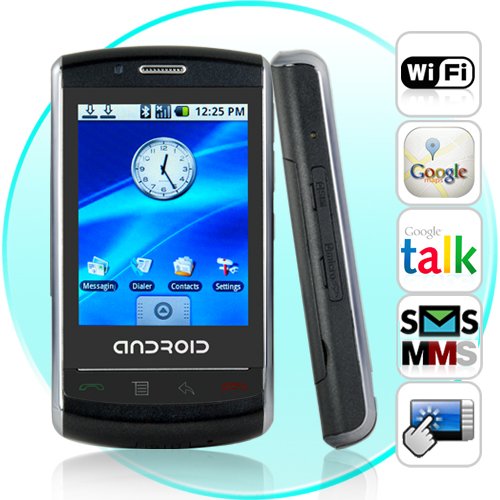
The Robot - 2.8 Inch Touchscreen Cellphone with Android OS


More than 10 available
Details
Shipping: Australia: free (more destinations)
Condition: Brand new
*The store has not been updated recently. You may want to contact the merchant to confirm the availability of the product.
CVNC-M80
Welcome to 2010, a new year and a brand new phone. The Robot Android OS cell phone is here. With plenty of great apps, Wifi, and being fully unlocked, this is THE mobile phone for people who enjoy taking control of their communication experience.
With a Samsung 2448 400Mhz processor for quick response time along with the user-friendly Android OS environment, you can make phone calls, send text messages, create media enhanced picture messages, and much more inside the phone's richly enhanced GUI menu system. Better still, you have instant access to all of your favorite Google applications like Gmail, Google Maps, Google Search, and Google Talk.
Much like a mini netbook computer, the Robot Superphone lets you do so much more than a regular cell phone. Already pre-loaded with over 20 apps, you can instant message, send email, check the weather, read your favorite RSS feeds, and do so much more with a single cellphone.
With all those pre-loaded applications on the Robot Superphone you can already communicate with friends, family and colleagues in every way possible, but that is not all! New tools and toys are constantly being developed for the Android OS which you can download from the Google Apps store or other internet sites onto your microSD memory card (a 2GB card is included free!) to run on your new Superphone. Since Android is an open-source operating system, you will be able to enjoy a constant stream of new, exciting, and often free selection of software to enjoy on your new Robot Superphone.
You can also use the phone's wireless connection to surf the internet on wifi wireless hotspots. Not only will this allow you to be more productive and enjoy your free time more, but when you surf the internet on your wifi connection - it is free, with no need to use up your cell phone data plan minutes!
If you are in the market for a new phone for yourself or the one you love, then this is the phone for you! The Robot Superphone is designed to be the most interesting phone you have ever owned. Made for today's busy lifestyle, this mobile phone really will cater to your every need, whether you are a corporate exec or soccer mom. It is in stock in our warehouse right now for single piece or large bulk purchases, so order yours today and we will express ship it out tomorrow!
At a Glance...
Wifi
Unlocked
Reads PDF Files
Google Android OS
New Robot Superphone
Dual Band GSM (900/1800)
2.8 Inch Touchscreen Display
2GB microSD memory card is included free!
Pre-loaded with plenty of Apps (more than 25!)
Power phone for power-users, but at a low wholesale price!
Download new software tools and toys to your microSD card to run on your Superphone
NOTE: This product is compatible with the worldwide standard GSM frequencies of 900MHz and 1800MHz. Please check with your local provider if you are unsure of your local band requirement.
GSM Frequency Information
This Cell Phone works with the following GSM Frequencies:
900 MHz + 1800 MHz
Please check that the local cell network matches the phone's GSM standard.
Click here to view frequencies for all major worldwide cell phone networks.
Manufacturer Specifications
Main Function: Robot Dual Band Cellphone With Android OS
Network: GSM Dual Band 900 / 1800 MHZ
Display: 2.8 Inch LCD Touchscreen Display
Processor: Samsung 2448 400Mhz
Operating System: Google Android
Model Number: TA1.ANDROID.en
Firmware Version: IFX 900/1800
Camera: 1.3-megapixel CMOS
Memory:
- Internal - 512 MB
- External: 2GB Micro SD Memory Card Included
Bluetooth: Bluetooth 2.0, High Speed Transfer
Internet: GPRS, WAP, Wi-Fi 802.11b/g
Data Services: SMS, MMS, GPRS
Battery
- Up to 180 - 300 minutes talk tim
- Up to 180 - 300 hours stand-by time
Speaker: Built in stereo loudspeakers
Date & Time: Automatic, Set Date, Select Time Zone, Set Time, Use 24 Hour Format, Select Date Format
Connectivity: Bluetooth (for Bluetooth Headset only), Wi-Fi 802.11b/g
Power Source: Rechargeable Li-ion Battery 1200mAh 3.7V
Charging Method: Wall AC/DC Adapter 100-240V, or USB charge via PC
Primary Menu Options: Advanced, Alarm Clock, Browser, Calculator, Calibrate Screen, Camera, Contacts, Dev Tools, Dialler, Email, Gallery, Gmail, Google Talk, IM+, MAP’s, Market, Messaging, Music, Note Pad, OI File Management, Quick Office, RepliGo Reader, RSS Reader, Settings, Spare Parts, Weather Widgets
Status Display: Battery Status, Battery Level, Phone Number, Network, Signal Strength, Mobile Network Type, Service State, Roaming, Mobile Network State, IMEI SV, Wi-Fi MAC Address, Bluetooth Address, UP Time
Wireless Controls: Wi-Fi, Wi-Fi Settings, Bluetooth, Bluetooth Settings, Mobile Networks
Call Settings: Fixed Dialing Number, Voice Mail, Call Forwarding, Additional Call
Sound & Display: Silent Mode, Ring Volume, Media Volume, Phone Ringtone, Phone Vibrate, Notifications Ringtone, Audible Touch Tones, SD Card Notifications, Animations, Brightness, Screen Time Out.
Security & Location: Use Wireless Network, Set Unlock Pattern, Set-up SIM Card Lock, Visible Passwords
Applications: Unknown Sources, manage Applications, Development
SD Card & Phone Storage: USB Mass Storage, Total Space, Available Space, Un-mount SD Card, Format SD Card, Internal Storage, Factory DATA Reset
Still Camera Specs
- Resolution - 1600 x 1200
- Format - JPEG
- Zoom -/+, Gallery, Set As, Share, Delete
- Share Via Gmail, Messaging
- Set As - Contact Icon, Wallpaper
Media Supported Formats
- Video - 3GP
- Music - MP3, MIDI, WAV, WMA,
- Pictures - JPEG, PNG, GIF
- EBook Reader - TXT, PDF
Languages: English, French, Russian, Spanish, German, Simplified Chinese
Dimensions: L:106 x W:58 x D:16
Manufacturers Ref: ADR13T6K0A23
Product Notes
Android OS Smartphone
Included 2GB bonus TF card with 10 bonus apps included
The USB connection is designed only to charge the Android cellphone
Run the music player in the background while you browse the rest of your cellphone
Detailed User Manual is PDF format, located on the included Micro SD Memory Card
Sub-Primary Menu Options
- Advanced - Applications, Processes, Systems, Un-install
- Contacts - Dialer, Call Log, Contacts, Favorite
- DEV Tools - Development Settings, Exception Browser, Google Login Service, GTalk Service Monitor, Instrumentation, Media Scanner, Package Browser, Pointer Location, RAW Image Viewer, Running Processes, Terminal Emulator
- Gallery - All Pictures, All Videos, Audio, My Music, Videos (In Thumbnail View)
- Messages - Compose New Message, (Messages Viewed As Threads), Forward, Copy Text Message, View Message Details, Delete Message, Add To Contacts, Call
- Music Player - Artist, Albums, Songs, Play list (In Thumbnail View)
- Spare Parts - Battery History, battery Information, Usage Statistics, Windows Animations, Fancy Input Animations, Fancy Rotation Animations, Font Size
- Settings - Wireless Control, Call Settings, Sound & Display, Security & Location, Applications, Date & Time, Locate & Text, About Phone
Package Contents for Model - CVNC-M80
The Robot Dual Band Touchscreen Android Cellphone
USB Wall Adapter (100-240v)
Stylus
USB Cable
Bonus 2GB TF Card (included free!)
User Manual - English
Wired stereo earphones with built-in MIC and clip
Lithium-ion Rechargeable Battery 1200mAh 3.7V
FAQ - Frequently Asked Questions
Is this a an original Android Cellphone?
Yes, the Android (OS) Operating System is an Open Source software, available from Google for developers
Can I use this phone in the United States?
No. This phone is a dual band GSM 900/1800 cellular phone. It will work in Europe and other parts of the world that use the 900/1800 mhz standard, but it will not work in North America (U.S., Canada, Mexico)
How can I forward or delete a text message?
When you are browsing through your text messages, you can just touch and hold down on the screen for 2 seconds and a pop up window will appear with options to delete, forward, etc.
Is there a faster way to put the phone in silent mode?
To put the phone in silent mode, press the power ON/OFF button and you will be given the option to switch off the phone or put it on silent mode.
How can I access the App Store directly from the Android superphone?
First, go to www.andappstore.com using your computer, and download an app called "AndAppStore", This app lets you access the (free) store directly on your new Robot Android superphone and download apps, wallpapers, pictures, and more. Download the "AndAppStore" and install it via the included Micro SD card, then run the File Manager on the Robot superphone, and install the "AndAppStore".
Welcome to 2010, a new year and a brand new phone. The Robot Android OS cell phone is here. With plenty of great apps, Wifi, and being fully unlocked, this is THE mobile phone for people who enjoy taking control of their communication experience.
With a Samsung 2448 400Mhz processor for quick response time along with the user-friendly Android OS environment, you can make phone calls, send text messages, create media enhanced picture messages, and much more inside the phone's richly enhanced GUI menu system. Better still, you have instant access to all of your favorite Google applications like Gmail, Google Maps, Google Search, and Google Talk.
Much like a mini netbook computer, the Robot Superphone lets you do so much more than a regular cell phone. Already pre-loaded with over 20 apps, you can instant message, send email, check the weather, read your favorite RSS feeds, and do so much more with a single cellphone.
With all those pre-loaded applications on the Robot Superphone you can already communicate with friends, family and colleagues in every way possible, but that is not all! New tools and toys are constantly being developed for the Android OS which you can download from the Google Apps store or other internet sites onto your microSD memory card (a 2GB card is included free!) to run on your new Superphone. Since Android is an open-source operating system, you will be able to enjoy a constant stream of new, exciting, and often free selection of software to enjoy on your new Robot Superphone.
You can also use the phone's wireless connection to surf the internet on wifi wireless hotspots. Not only will this allow you to be more productive and enjoy your free time more, but when you surf the internet on your wifi connection - it is free, with no need to use up your cell phone data plan minutes!
If you are in the market for a new phone for yourself or the one you love, then this is the phone for you! The Robot Superphone is designed to be the most interesting phone you have ever owned. Made for today's busy lifestyle, this mobile phone really will cater to your every need, whether you are a corporate exec or soccer mom. It is in stock in our warehouse right now for single piece or large bulk purchases, so order yours today and we will express ship it out tomorrow!
At a Glance...
Wifi
Unlocked
Reads PDF Files
Google Android OS
New Robot Superphone
Dual Band GSM (900/1800)
2.8 Inch Touchscreen Display
2GB microSD memory card is included free!
Pre-loaded with plenty of Apps (more than 25!)
Power phone for power-users, but at a low wholesale price!
Download new software tools and toys to your microSD card to run on your Superphone
NOTE: This product is compatible with the worldwide standard GSM frequencies of 900MHz and 1800MHz. Please check with your local provider if you are unsure of your local band requirement.
GSM Frequency Information
This Cell Phone works with the following GSM Frequencies:
900 MHz + 1800 MHz
Please check that the local cell network matches the phone's GSM standard.
Click here to view frequencies for all major worldwide cell phone networks.
Manufacturer Specifications
Main Function: Robot Dual Band Cellphone With Android OS
Network: GSM Dual Band 900 / 1800 MHZ
Display: 2.8 Inch LCD Touchscreen Display
Processor: Samsung 2448 400Mhz
Operating System: Google Android
Model Number: TA1.ANDROID.en
Firmware Version: IFX 900/1800
Camera: 1.3-megapixel CMOS
Memory:
- Internal - 512 MB
- External: 2GB Micro SD Memory Card Included
Bluetooth: Bluetooth 2.0, High Speed Transfer
Internet: GPRS, WAP, Wi-Fi 802.11b/g
Data Services: SMS, MMS, GPRS
Battery
- Up to 180 - 300 minutes talk tim
- Up to 180 - 300 hours stand-by time
Speaker: Built in stereo loudspeakers
Date & Time: Automatic, Set Date, Select Time Zone, Set Time, Use 24 Hour Format, Select Date Format
Connectivity: Bluetooth (for Bluetooth Headset only), Wi-Fi 802.11b/g
Power Source: Rechargeable Li-ion Battery 1200mAh 3.7V
Charging Method: Wall AC/DC Adapter 100-240V, or USB charge via PC
Primary Menu Options: Advanced, Alarm Clock, Browser, Calculator, Calibrate Screen, Camera, Contacts, Dev Tools, Dialler, Email, Gallery, Gmail, Google Talk, IM+, MAP’s, Market, Messaging, Music, Note Pad, OI File Management, Quick Office, RepliGo Reader, RSS Reader, Settings, Spare Parts, Weather Widgets
Status Display: Battery Status, Battery Level, Phone Number, Network, Signal Strength, Mobile Network Type, Service State, Roaming, Mobile Network State, IMEI SV, Wi-Fi MAC Address, Bluetooth Address, UP Time
Wireless Controls: Wi-Fi, Wi-Fi Settings, Bluetooth, Bluetooth Settings, Mobile Networks
Call Settings: Fixed Dialing Number, Voice Mail, Call Forwarding, Additional Call
Sound & Display: Silent Mode, Ring Volume, Media Volume, Phone Ringtone, Phone Vibrate, Notifications Ringtone, Audible Touch Tones, SD Card Notifications, Animations, Brightness, Screen Time Out.
Security & Location: Use Wireless Network, Set Unlock Pattern, Set-up SIM Card Lock, Visible Passwords
Applications: Unknown Sources, manage Applications, Development
SD Card & Phone Storage: USB Mass Storage, Total Space, Available Space, Un-mount SD Card, Format SD Card, Internal Storage, Factory DATA Reset
Still Camera Specs
- Resolution - 1600 x 1200
- Format - JPEG
- Zoom -/+, Gallery, Set As, Share, Delete
- Share Via Gmail, Messaging
- Set As - Contact Icon, Wallpaper
Media Supported Formats
- Video - 3GP
- Music - MP3, MIDI, WAV, WMA,
- Pictures - JPEG, PNG, GIF
- EBook Reader - TXT, PDF
Languages: English, French, Russian, Spanish, German, Simplified Chinese
Dimensions: L:106 x W:58 x D:16
Manufacturers Ref: ADR13T6K0A23
Product Notes
Android OS Smartphone
Included 2GB bonus TF card with 10 bonus apps included
The USB connection is designed only to charge the Android cellphone
Run the music player in the background while you browse the rest of your cellphone
Detailed User Manual is PDF format, located on the included Micro SD Memory Card
Sub-Primary Menu Options
- Advanced - Applications, Processes, Systems, Un-install
- Contacts - Dialer, Call Log, Contacts, Favorite
- DEV Tools - Development Settings, Exception Browser, Google Login Service, GTalk Service Monitor, Instrumentation, Media Scanner, Package Browser, Pointer Location, RAW Image Viewer, Running Processes, Terminal Emulator
- Gallery - All Pictures, All Videos, Audio, My Music, Videos (In Thumbnail View)
- Messages - Compose New Message, (Messages Viewed As Threads), Forward, Copy Text Message, View Message Details, Delete Message, Add To Contacts, Call
- Music Player - Artist, Albums, Songs, Play list (In Thumbnail View)
- Spare Parts - Battery History, battery Information, Usage Statistics, Windows Animations, Fancy Input Animations, Fancy Rotation Animations, Font Size
- Settings - Wireless Control, Call Settings, Sound & Display, Security & Location, Applications, Date & Time, Locate & Text, About Phone
Package Contents for Model - CVNC-M80
The Robot Dual Band Touchscreen Android Cellphone
USB Wall Adapter (100-240v)
Stylus
USB Cable
Bonus 2GB TF Card (included free!)
User Manual - English
Wired stereo earphones with built-in MIC and clip
Lithium-ion Rechargeable Battery 1200mAh 3.7V
FAQ - Frequently Asked Questions
Is this a an original Android Cellphone?
Yes, the Android (OS) Operating System is an Open Source software, available from Google for developers
Can I use this phone in the United States?
No. This phone is a dual band GSM 900/1800 cellular phone. It will work in Europe and other parts of the world that use the 900/1800 mhz standard, but it will not work in North America (U.S., Canada, Mexico)
How can I forward or delete a text message?
When you are browsing through your text messages, you can just touch and hold down on the screen for 2 seconds and a pop up window will appear with options to delete, forward, etc.
Is there a faster way to put the phone in silent mode?
To put the phone in silent mode, press the power ON/OFF button and you will be given the option to switch off the phone or put it on silent mode.
How can I access the App Store directly from the Android superphone?
First, go to www.andappstore.com using your computer, and download an app called "AndAppStore", This app lets you access the (free) store directly on your new Robot Android superphone and download apps, wallpapers, pictures, and more. Download the "AndAppStore" and install it via the included Micro SD card, then run the File Manager on the Robot superphone, and install the "AndAppStore".


