$31.01
Add to Cart
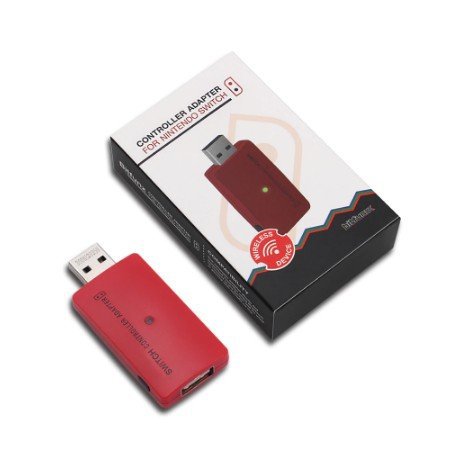
Wireless USB Red Adapter for Switch to PS4/PS3/PlayStation Pro/Xbox One S/X
5 available
Details
Shipping: Australia: $15.00 (more destinations)
Condition: Brand new
Returns: 7 days, buyer pays return shipping (more)
Information
The controller adapter is a no lag USB device that connects via a free USB port on the Nintendo Switch docking station. This then allows a Bluetooth connecting controller, such as a PlayStation 4 or Xbox ‘One S’ controller to be used or alternatively ANY PS4, PS3, or Xbox 360 or Xbox One USB wired controller.
SUPPORT
The controller adapter allows any controller using Bluetooth to connect to the Switch and be used in gaming with virtually no lag.
This includes but isn’t restricted to:
PlayStation 3
PlayStation 4
PlayStation Pro
Xbox One S
Xbox One X
HOW TO USE
Alternatively, it allows all USB controllers to be connected including the version one Xbox One controller. The controller adapter is incredibly easy to use.
Red Light – Flashing means that it isn’t connected
Yellow Light – Flashing means that it is searching for a connection
Green Light – Solid means its connected
To put it into ‘pairing mode’ just press the sync button on the side of the adapter.
1) Plug the controller adapter into an empty USB socket on the Nintendo Switch Dock.
2) When connected press the sync button on the side of the adapter.
3) The adapter should now be flashing yellow.
4) Choose your controller and set it to search e.g. Xbox One S sync button or for PS4 hold the sync and PS button
5) After a minute they will connect and the light will turn to a solid green colour.
6) It’s now connected and ready for use…..
Alternatively, simply connect the USB cable to your controller and the other end into the
controller adapter. The light will turn green immediately and there should be a vibration
prompt indicating that the controller is ready for use.
IMPORTANT NOTES: PLEASE READ
1) Only one controller can connect to a single adapter at each time regardless of whether
it’s wired or wireless.
2) To make sure the adapter can easily identify the controller, on the Nintendo Switchplease go into the ‘System Settings’, navigate down to ‘Controllers and Sensors’ and enable ‘Pro Controller Wired Communication’
3) The controller adapter is also compatible with a Sony PS3 or a PC running Windows 7 or
Windows 10 Operating Systems.
4) For connection to a PS3, please plug the controller adapter into a free USB slot on your
PS3. The connection process is the same as for the Nintendo Switch.
5) For the PC, please plug the controller adapter into a free USB slot on your PC. The
controller adapter works using a driverless system so no drivers are required for both wired
and wireless operation.
PACKAGE
1 x USB Adapter
The controller adapter is a no lag USB device that connects via a free USB port on the Nintendo Switch docking station. This then allows a Bluetooth connecting controller, such as a PlayStation 4 or Xbox ‘One S’ controller to be used or alternatively ANY PS4, PS3, or Xbox 360 or Xbox One USB wired controller.
SUPPORT
The controller adapter allows any controller using Bluetooth to connect to the Switch and be used in gaming with virtually no lag.
This includes but isn’t restricted to:
PlayStation 3
PlayStation 4
PlayStation Pro
Xbox One S
Xbox One X
HOW TO USE
Alternatively, it allows all USB controllers to be connected including the version one Xbox One controller. The controller adapter is incredibly easy to use.
Red Light – Flashing means that it isn’t connected
Yellow Light – Flashing means that it is searching for a connection
Green Light – Solid means its connected
To put it into ‘pairing mode’ just press the sync button on the side of the adapter.
1) Plug the controller adapter into an empty USB socket on the Nintendo Switch Dock.
2) When connected press the sync button on the side of the adapter.
3) The adapter should now be flashing yellow.
4) Choose your controller and set it to search e.g. Xbox One S sync button or for PS4 hold the sync and PS button
5) After a minute they will connect and the light will turn to a solid green colour.
6) It’s now connected and ready for use…..
Alternatively, simply connect the USB cable to your controller and the other end into the
controller adapter. The light will turn green immediately and there should be a vibration
prompt indicating that the controller is ready for use.
IMPORTANT NOTES: PLEASE READ
1) Only one controller can connect to a single adapter at each time regardless of whether
it’s wired or wireless.
2) To make sure the adapter can easily identify the controller, on the Nintendo Switchplease go into the ‘System Settings’, navigate down to ‘Controllers and Sensors’ and enable ‘Pro Controller Wired Communication’
3) The controller adapter is also compatible with a Sony PS3 or a PC running Windows 7 or
Windows 10 Operating Systems.
4) For connection to a PS3, please plug the controller adapter into a free USB slot on your
PS3. The connection process is the same as for the Nintendo Switch.
5) For the PC, please plug the controller adapter into a free USB slot on your PC. The
controller adapter works using a driverless system so no drivers are required for both wired
and wireless operation.
PACKAGE
1 x USB Adapter
Other Products from californian (View All)
-
$31.03
-
$31.04
-
$294.43

-
$294.45

-
$294.46
-
$294.47
-
$294.49

-
$294.50
-
$294.52

-
$294.53