
$94.55
Add to Cart
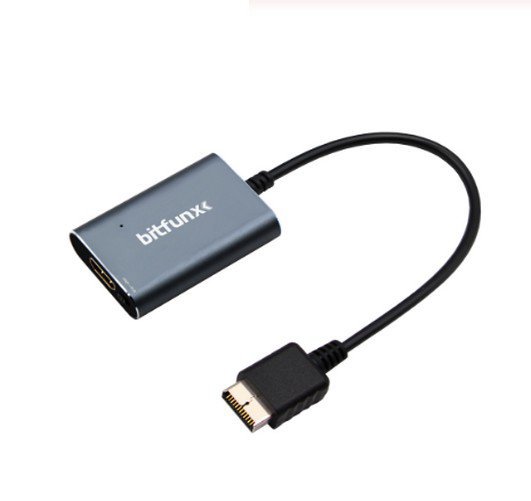
HDMI Adapter Lead for PlayStation 2 Including RGB Component Switch For PS2
5 available
Details
Shipping: Australia: $15.00 (more destinations)
Condition: Brand new
Returns: 7 days, buyer pays return shipping (more)
INTRODUCTION
The majority of modern Televisions have connectivity via HDMI and lack some of the older inputs which retro game consoles use. With the HDMI adapter cable, you can bring your old PS2 back to life on a newer TV and relive those gaming classics, with a simple ‘PLUG AND PLAY’ solution!
FEATURES
1) Compatible with PlayStation 2’s from All Regions. Includes Instructions, Power/HDMI Cables. Video and Audio in Full Digital HDMI format with zero transmission loss!
2) Built in RGB to YPbPr switch – Only available on the PS2 Adaptor. No more black screens! Provides advanced signal processing with great precision, colours and resolution!
3) Supports all PS2 display modes (240p, 480i, 480p, PAL 576i).
4) Works with the majority of HDMI enabled televisions and monitors.
5) Hassle Free! Plug and Play as you go.
6) Small and discreet USB power connector offering greater convenience over a mains socket plug.
INSTRUCTIONS SETTING
1) Remove previous PS2 A/V cable and connect HDMI adapter.
2) Plug one end of your HDMI cable into the HDMI converter, and the other end into a free HDMI socket on your TV.
3) Select the ‘RGB’ slider on the PS2 HDMI adapter.
4) Power on your PS2 and TV. Make sure your TV’s A/V INPUT has been switched to the correct HDMI input where the PS2 is connected.
5) Verify that you can see the PS2 picture on your TV – The HDMI adapter LED should now be Green in colour.
6) As described and shown above, visit the PS2 configuration menu and change the Component Video Out’ setting to: Y Cb/Pb Cr/Pr.
7) Change the slider on the PS2 HDMI adapter to: YPbPr.
8) If you experience any green screens or distorted images during configuration, it is likely the RGB setting or Component settings are selected with the incorrect output in the PS2 configuration menu.
Please Note: The HDMI adapter does not upscale or tweak the image. If you are looking for more control over your image, then please consider the OSSC (Open Source Scan Converter). You can search on my store as well.
PACKAGE
1 x Adapter
The majority of modern Televisions have connectivity via HDMI and lack some of the older inputs which retro game consoles use. With the HDMI adapter cable, you can bring your old PS2 back to life on a newer TV and relive those gaming classics, with a simple ‘PLUG AND PLAY’ solution!
FEATURES
1) Compatible with PlayStation 2’s from All Regions. Includes Instructions, Power/HDMI Cables. Video and Audio in Full Digital HDMI format with zero transmission loss!
2) Built in RGB to YPbPr switch – Only available on the PS2 Adaptor. No more black screens! Provides advanced signal processing with great precision, colours and resolution!
3) Supports all PS2 display modes (240p, 480i, 480p, PAL 576i).
4) Works with the majority of HDMI enabled televisions and monitors.
5) Hassle Free! Plug and Play as you go.
6) Small and discreet USB power connector offering greater convenience over a mains socket plug.
INSTRUCTIONS SETTING
1) Remove previous PS2 A/V cable and connect HDMI adapter.
2) Plug one end of your HDMI cable into the HDMI converter, and the other end into a free HDMI socket on your TV.
3) Select the ‘RGB’ slider on the PS2 HDMI adapter.
4) Power on your PS2 and TV. Make sure your TV’s A/V INPUT has been switched to the correct HDMI input where the PS2 is connected.
5) Verify that you can see the PS2 picture on your TV – The HDMI adapter LED should now be Green in colour.
6) As described and shown above, visit the PS2 configuration menu and change the Component Video Out’ setting to: Y Cb/Pb Cr/Pr.
7) Change the slider on the PS2 HDMI adapter to: YPbPr.
8) If you experience any green screens or distorted images during configuration, it is likely the RGB setting or Component settings are selected with the incorrect output in the PS2 configuration menu.
Please Note: The HDMI adapter does not upscale or tweak the image. If you are looking for more control over your image, then please consider the OSSC (Open Source Scan Converter). You can search on my store as well.
PACKAGE
1 x Adapter
You may also be interested in:
-
$4.28

-
$50.08

-
$2.85

-
$2.85

-
$25.53

-
$8.58

-
$5.72

-
$2.85

-
$4.28

-
$2.85


