$63.02
Add to Cart
Toddler Toys Flash Cards Spanish - 224 Sight Words Pocket Speech Therapy Toys -
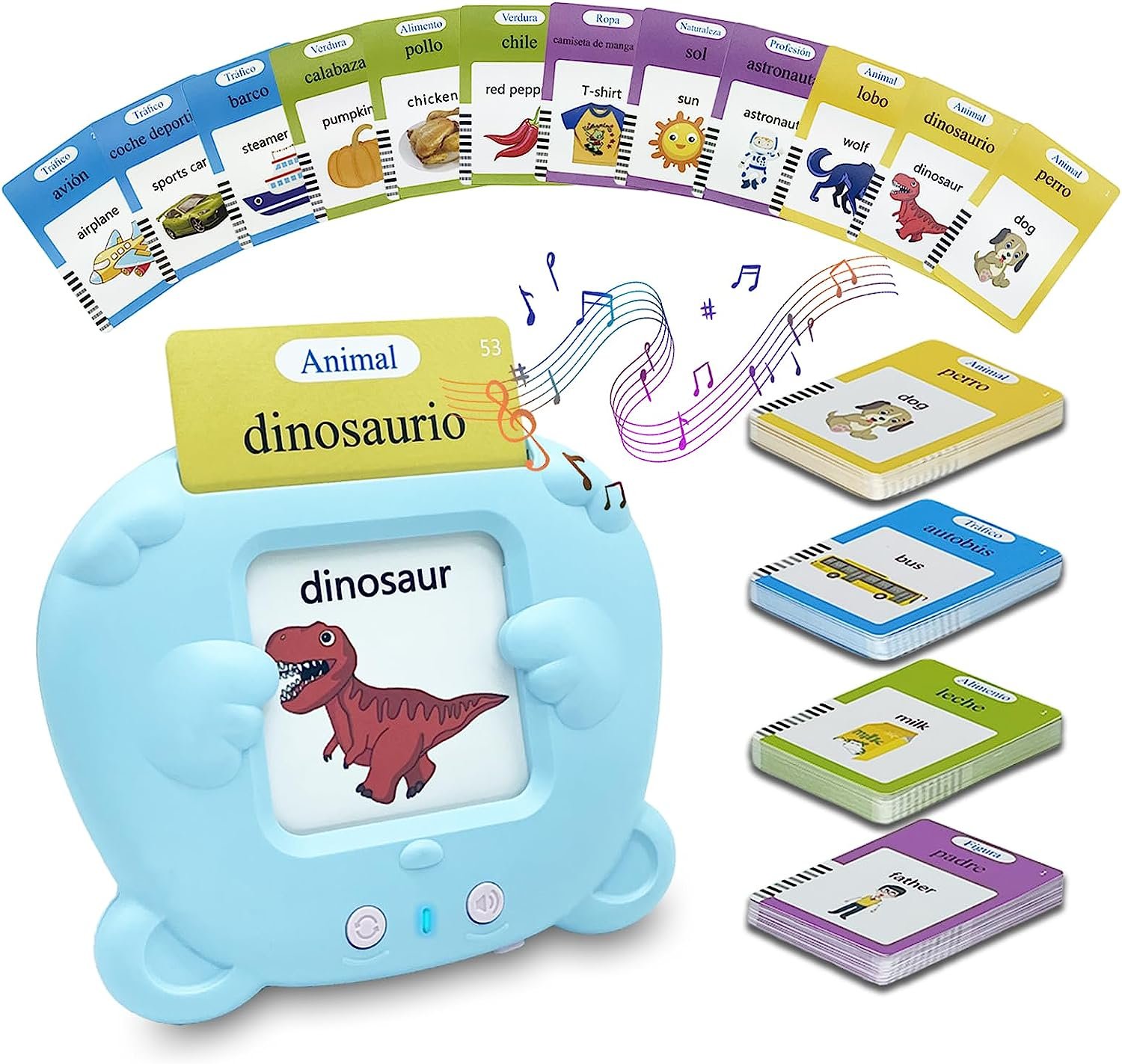


English & Spanish Bilingual Version Toddler Learning Toys: Talking flash cards for toddlers includes a learning card machine and 112 double-sided flashcards 224 sight words Covering 12 Themes Includes Person X 8; Colors X 9; Shapes X 5; Animals X 56; Food X 21; Fruits X 18; Vegetables X 17; Object X 31; Clothes X 16; Nature X 10; Jobs X 8; Transportation X 25.Smart Learning Educational Cards: Designed by teachers, an excellent tool for homeschooling use or in the preschool classroom, educational interactive toy also features realistic animal and car simulation sounds, which is good for inspiring children's phonological abilities and the colorful illustrations and funny sounds can attract children's attention and learning interest.Appliable Both for Home & Class: This toddler toys can be used by parents and teachers to teach little ones learning talking, expand vocabulary and reinforce sight words in a much more interesting way, especially helpful for autistic kids to develop speech capability.Easy to Use: Put the card into the card reader’s slot, the card reader will pronounce the words. When an animal card or transport card is inserted the card reader will play real animal or transport’s sound. Press the repeat button to repeat the pronunciation and sound effect. This montessori toy keeps kids away from mobile phone and tablets, reduce screen time effectively.Perfect Gifts for 3+ Years Old Boys Girls: It is a great educational toys for 3 4 5 6 years old kids. This will be your perfect choice for funny learning toys gifts to kids. It is apply for both home and class. Play it with kids, enjoy the harmonius family time while learning and playing. Product Description Easy to use Step 1 - Press ON/OFF switch to Turn On the card reader and the indication light will be on; Step 2 - Insert the card, and the speaker on the back will read the word correctly; Step 3 - Press the Repeat button to listen the word again and you can adjust the volume through Volume button; (5 level to adjust) How to Change Language? Just press the ④Volume Button and ⑤Repeat Button at the same time for few seconds. And re-insert the card. Track Page Views WithAuctiva's Counter
You may also be interested in:
-
$12.88
-
$11.45
-
$27.21

-
$10.73
-
$24.35
-
$11.45

-
$21.48
-
$18.61
-
$10.73
-
$17.90