
$23.01
Add to Cart
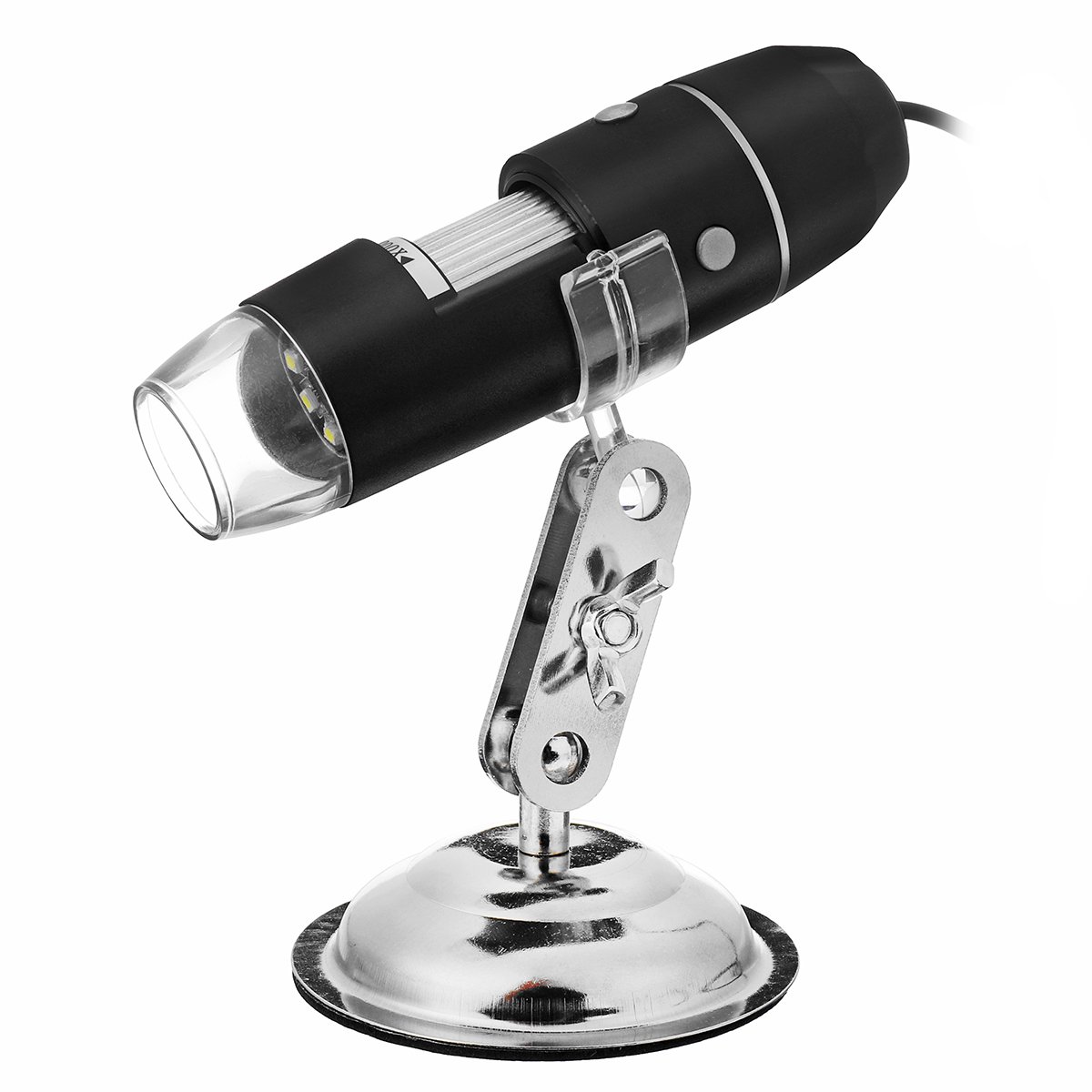
1000X/1600X Led USB Electronic Digital Microscope Magnifier for PC Android phone Tablet
More than 10 available
Details
Shipping: Australia: $4.00 (more destinations)
Condition: Brand new
*The store has not been updated recently. You may want to contact the merchant to confirm the availability of the product.


Features:в… Touch dimming, durable.в… Adjustable height bracket, made of wear-resistant aluminum alloy.в… Balanced base, thick wear-resistant anti-skid floor.
Specifications:- Type1: 1000x , Type2: 1600x
- Magnification: 1000x, 1600x- Sensor: High-performance photosensitive chip- Main control chip: dedicated main control 24Bit DSP- Photo / video: built-in- Auxiliary light source: 8 white LED lights- Static resolution: standard 640 * 480, maximum 1600 * 1 200- Digital zoom: 6-segment- Imaging distance: manually adjust 8 MM to infinity- Image resolution: standard 640 * 480, maximum 1800 * 1200- CD-ROM: contains drivers, measurement software, user manual- Support system: WIN XP / NISTANWIN 7/8 /8.1/10- Power supply: USB (5V DC)- Computer interface: USB3.0 / 2.0 1 1.1- Number of dynamic frames: 30f / s- Illumination range: 0 ~ 30000LUX adjustable by wire- Hardware requirements: Pentium main frequency 700M Hz or above 1 10 hard disk CD ROM drive: 64MB memory- Supported languages: Chinese (Simplified) Chinese (Traditional), English (other languages need to be customized)- Product color: matte black- Body size: 112 mm (length) 33 mm (outer diameter)
Package Included:1x USB Digital Microscope1x Microscope Stand1x Installation CD1x Quick Start Guide1x Calibration Ruler
How to use:1. Connect the USB digital microscope to computerвЂs USB port directly.2. Put the CD into CD-ROM, then open “My computer”, run the Autorun.3. Install the Driver, then reset the computer.4. If the PC SYSTEM is Win XP or older version, Net. Framework 4.0 isneeded. Please install it. If antivirus software shows any notice, pleasechoose “allow all”, if the driver or measurement is limited by the antivirussoftware, they may get problems in installing and running.5. Choose and install the Measurement, when finished, open and use it.6. If the driver or measurement can’t be installed or run, please set SystemAuthority and Compatible Mode to them;7. After installation, click on the desktop icons to run the softwares; Let themicroscope lens focus to the object, then adjust roller manually andslowly, until you see a clear image (different models have different focusrange, you can't see anything beyond the focus range).8. More detailed instructions and about the measurement, please read theUser Manual.pdf in the CD (opened by PDF reader).
Notes before use:1. Don't dissemble the digital Microscope or change the interior parts, it cancause damage.2. Don't clean the Microscope with alcohol organic solvents.3. Don't touch the lens with your fingers.4. Storage temperature: 0В°C ~40В°C; Humidity: 45%RH ~ 85RH%.5. Prevent the product from getting wet, leave PC connection immediately. And donot dissemble or dry by hair dryer. Send to repair center if the digitalmicroscope was effected by liquid or other elements.6. Measurement Data only for reference.
Specifications:- Type1: 1000x , Type2: 1600x
- Magnification: 1000x, 1600x- Sensor: High-performance photosensitive chip- Main control chip: dedicated main control 24Bit DSP- Photo / video: built-in- Auxiliary light source: 8 white LED lights- Static resolution: standard 640 * 480, maximum 1600 * 1 200- Digital zoom: 6-segment- Imaging distance: manually adjust 8 MM to infinity- Image resolution: standard 640 * 480, maximum 1800 * 1200- CD-ROM: contains drivers, measurement software, user manual- Support system: WIN XP / NISTANWIN 7/8 /8.1/10- Power supply: USB (5V DC)- Computer interface: USB3.0 / 2.0 1 1.1- Number of dynamic frames: 30f / s- Illumination range: 0 ~ 30000LUX adjustable by wire- Hardware requirements: Pentium main frequency 700M Hz or above 1 10 hard disk CD ROM drive: 64MB memory- Supported languages: Chinese (Simplified) Chinese (Traditional), English (other languages need to be customized)- Product color: matte black- Body size: 112 mm (length) 33 mm (outer diameter)
Package Included:1x USB Digital Microscope1x Microscope Stand1x Installation CD1x Quick Start Guide1x Calibration Ruler
How to use:1. Connect the USB digital microscope to computerвЂs USB port directly.2. Put the CD into CD-ROM, then open “My computer”, run the Autorun.3. Install the Driver, then reset the computer.4. If the PC SYSTEM is Win XP or older version, Net. Framework 4.0 isneeded. Please install it. If antivirus software shows any notice, pleasechoose “allow all”, if the driver or measurement is limited by the antivirussoftware, they may get problems in installing and running.5. Choose and install the Measurement, when finished, open and use it.6. If the driver or measurement can’t be installed or run, please set SystemAuthority and Compatible Mode to them;7. After installation, click on the desktop icons to run the softwares; Let themicroscope lens focus to the object, then adjust roller manually andslowly, until you see a clear image (different models have different focusrange, you can't see anything beyond the focus range).8. More detailed instructions and about the measurement, please read theUser Manual.pdf in the CD (opened by PDF reader).
Notes before use:1. Don't dissemble the digital Microscope or change the interior parts, it cancause damage.2. Don't clean the Microscope with alcohol organic solvents.3. Don't touch the lens with your fingers.4. Storage temperature: 0В°C ~40В°C; Humidity: 45%RH ~ 85RH%.5. Prevent the product from getting wet, leave PC connection immediately. And donot dissemble or dry by hair dryer. Send to repair center if the digitalmicroscope was effected by liquid or other elements.6. Measurement Data only for reference.
Other Products from lins-bay (View All)
-
$12.94
-
$10.06
-
$14.38
-
$25.89
-
$8.62
-
$12.94
-
$30.21
-
$21.57
-
$105.05
-
$5.74


 CN, Jiangsu Sheng
