
$57.42
Add to Cart
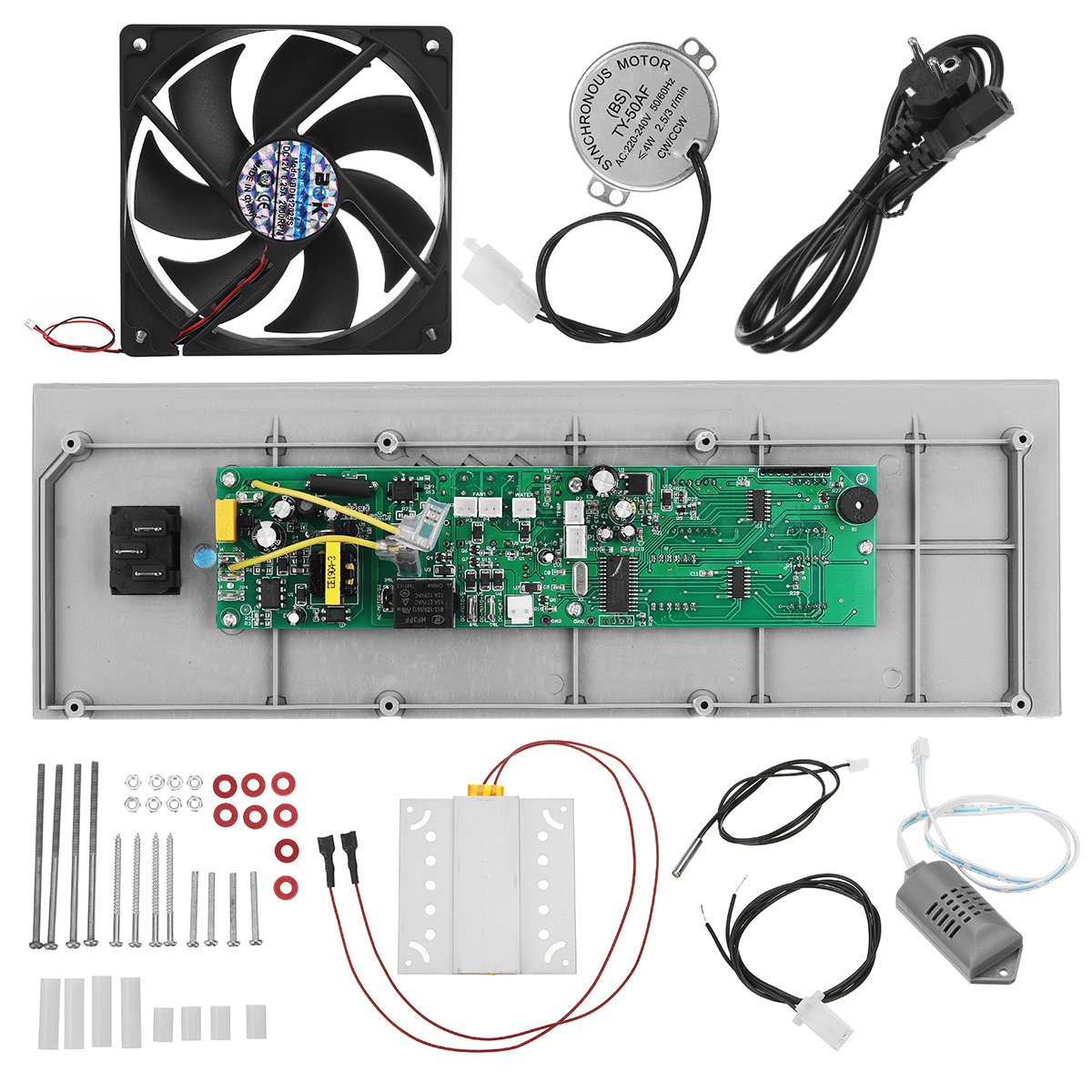
DIY Automatic Egg Incubator Spare Parts Egg Temperture Controller With Sensers Fans Incubator Set Co
More than 10 available
Details
Shipping: Australia: $4.00 (more destinations)
Condition: Brand new
*The store has not been updated recently. You may want to contact the merchant to confirm the availability of the product.


Features:в—Џ Exhaust fan: uniform heat dissipation, low noise, long use time.в—Џ Heating piece: constant temperature PTC heating, the hatching temperature is guaranteed.в—Џ Panel: imported chip panel, one-key incubation control.в—Џ Humidity probe: digital probe, stable performance.в—Џ Temperature probe: precision temperature sensor, accurate information collection.в—Џ Motor interface: This interface connects the motor and the egg tray.в—Џ Egg turning motor: special accessories for household incubator motor mini incubator.в—Џ Designed for incubationDIY Handmade Incubator Shocks Experience.
Specifications:- Rated power: 80W- Plug: AU plug, UK plug, EU plug- Temperature control range: 37В°C-39В°C- Rated voltage: 220V/110V/220+12V- Turnover frequency: 2H/time- Scope of application: 48pcs, 56pcs, 96pcs, 112pcs- Panel size: 33.2x3x10.2cm/13.1x1.2x4.0''
Package Included:1x Poultry Incubator Controller Set
Temperature and humidity parameter settings1. TestAfter connecting all components as shown in the figure, turn on the power, you will hear the alarm sound caused by temperature/humidity, manually press to cancel the alarm.
2. Set the temperature and humidity, change the number of incubation daysPress the setting key, press '+/-' to select the desired temperature, set the humidity and the number of incubation days in the same operation (repeat twice), and finally press the setting to exit the setting. (Note: The factory setting is 37.8В°C. You can set 37.6В°C according to the above method. After setting the incubation days, the machine restarts to take effect.)
3. Low/high temperature alarm parameter settingPress and hold the setting key for 3 seconds, press '+/', the display shows 'AL', then press the setting key, press '+/-' to select the low temperature parameter. Press and hold the setting key for 3 seconds, the display shows 'AH', set the high temperature alarm parameters as above.
4. Humidity alarm parameter settingThe humidity parameter is factory set at 45%, no need to set. (If you need to set, you can set according to the temperature parameter setting mode, the display shows 'AS'.)
5. Calibration temperature sensor readingThe normal temperature reading is set at 0В°C. If it is not correct, it can be set. The method is the same as above, and the display shows 'CA'. )
6. Temperature upper/lower limit setIf the HS (upper limit set) is set to 38.2 and the LS (lower limit set) is 37.4, the original temperature can only be changed from 38.2 to 37.4, and the lower limit should be at 37.2.
7. Heating element settingThe parameters HU and HD are set by the factory, no need to set.
Specifications:- Rated power: 80W- Plug: AU plug, UK plug, EU plug- Temperature control range: 37В°C-39В°C- Rated voltage: 220V/110V/220+12V- Turnover frequency: 2H/time- Scope of application: 48pcs, 56pcs, 96pcs, 112pcs- Panel size: 33.2x3x10.2cm/13.1x1.2x4.0''
Package Included:1x Poultry Incubator Controller Set
Temperature and humidity parameter settings1. TestAfter connecting all components as shown in the figure, turn on the power, you will hear the alarm sound caused by temperature/humidity, manually press to cancel the alarm.
2. Set the temperature and humidity, change the number of incubation daysPress the setting key, press '+/-' to select the desired temperature, set the humidity and the number of incubation days in the same operation (repeat twice), and finally press the setting to exit the setting. (Note: The factory setting is 37.8В°C. You can set 37.6В°C according to the above method. After setting the incubation days, the machine restarts to take effect.)
3. Low/high temperature alarm parameter settingPress and hold the setting key for 3 seconds, press '+/', the display shows 'AL', then press the setting key, press '+/-' to select the low temperature parameter. Press and hold the setting key for 3 seconds, the display shows 'AH', set the high temperature alarm parameters as above.
4. Humidity alarm parameter settingThe humidity parameter is factory set at 45%, no need to set. (If you need to set, you can set according to the temperature parameter setting mode, the display shows 'AS'.)
5. Calibration temperature sensor readingThe normal temperature reading is set at 0В°C. If it is not correct, it can be set. The method is the same as above, and the display shows 'CA'. )
6. Temperature upper/lower limit setIf the HS (upper limit set) is set to 38.2 and the LS (lower limit set) is 37.4, the original temperature can only be changed from 38.2 to 37.4, and the lower limit should be at 37.2.
7. Heating element settingThe parameters HU and HD are set by the factory, no need to set.
Other Products from lins-bay (View All)
-
$27.33
-
$32.96
-
$24.45
-
$26.96
-
$43.36

-
$94.20
-
$53.41
-
$68.42
-
$71.95
-
$24.45


 CN, Jiangsu Sheng
