
$17.18
Add to Cart
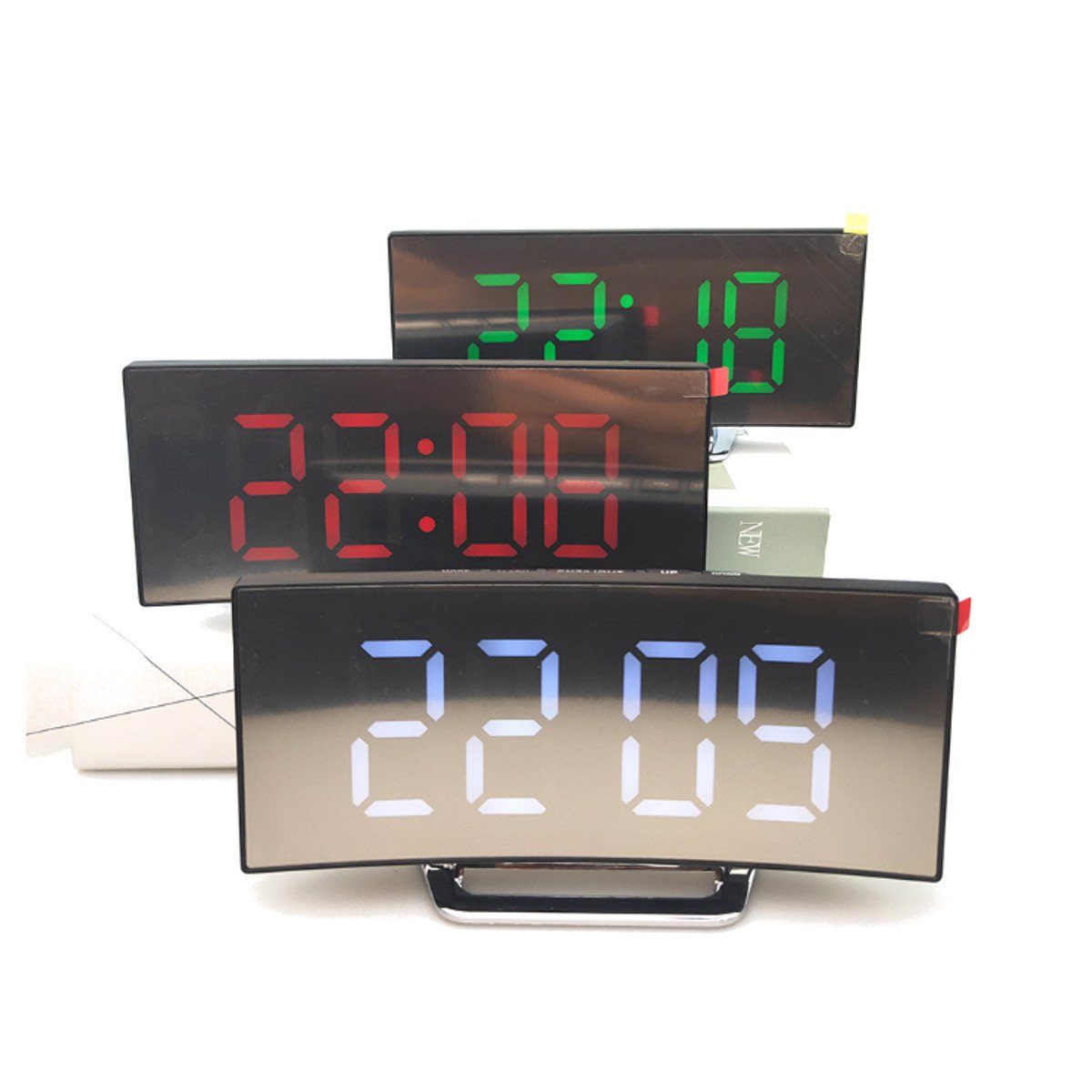
USB Rechargeable Mirror LED Alarm Clock Night Lights Thermometer Digital Clock
More than 10 available
Details
Shipping: Australia: $4.00 (more destinations)
Condition: Brand new
*The store has not been updated recently. You may want to contact the merchant to confirm the availability of the product.


3 Color Digital LED Alarm Clock Snooze Display Time Alarm Mirror Clock USB Charging Student Desk Clocks Specifications:Item type: Mirror alarm clockColor: silverDisplay light: White/Green/RedPackage size: 17*7.2*3.1CM/6.63x2.81x1.20inch(1cm=10mm=0.39inch)Measurement Details in the attached picture. Package included:1x Mirror alarm clock1x English manual1x USB Cable 1. Feature:в– LED time displayв– 12/24 hour format selecв– Alarm & snoozeв– Temperature displayin°C or °Fв– Temperature range: -10°C~ 50°C( 14°F-122°F )в– Night mode setting (18 : 00-06 : 00)в– 2 light luminance levelв– Five function button (MODE, AL ARM, SNZ/LIGHT, UP, DOWN)в– Time memory function (3*AAA batteries for time memory)в– Power consumption: 3*AAA batteries(Not included)USB charging cable(included) 2. BASIC OPERATIONa. When battery-on or power by USB cable, a BI sound heard with LED light onb. When battery-on, press the SNZ/LIGHT button, the LED will light on for 16 secondsC. When pluged with USB cable, the LED light will be on always 3. FUNCTION BUTTONSa.Press MODE button Switch displaying: Time - Date - Temperature - Night mode ON/OFFb.Press UP button to switch the light in 2 levelc.Under time mode, press on AL ARM to activate/deactivate the alarm function 4. OPERATION1) TIME SETTINGa. Under time mode, hold MODE button to enter the time setting mode. The setting gradation: 12/24HR - hour - minuteb. During the setting process, the setting article will flickC. Press UP once and ahead; hold UP for 2 seconds, Accelerated increased. Press DOWN once and back; press for 2 seconds, Accelerated reductione. If choose 12HR format, it will have PM display in the afternoon, but there is no AM to show the morning timef. Press MODE button or without any operation within 10 seconds to confirm the setting and go back to the normal display 2) DATE SETTINGa. Entry Date Mode by MODE, Long Press MODE Entry Date Settings, Default display January 1, 2018, Setting order is: year-month-dayb. During the setting process, the setting article will flickc. Press UP once and ahead; hold UP for 2 seconds, Accelerated increased. Press DOWN once and back; hold DOWN for 2 seconds, Accelerated reductionf. Press MODE button or without any operation within 10 seconds to confirm the setting and go back to the normal display 3) ALARM SETTINGa. Under time mode, hold Alarm button, the AL icon and and hour will flick, then enter the alarm time setting mode, the setting gradation: hour - minute - snooze time(from5-60 minutes)b. During the setting process, the setting article will flick Notice-Please allow slight deviation of measurement due to manual measurement.-Due to different monitors and different light, the picture may not reflect the actual color of the item.-Please consider the actual sizes shown in the listing as the pictures are generally enlarged to show detail.
You may also be interested in:
-
$322.43
-
$45.83
-
$47.26

-
$52.99

-
$22.90
-
$32.93
-
$42.27

-
$23.29
-
$8.69
-
$121.79


 CN, Jiangsu Sheng
