
$29.88
On Hold
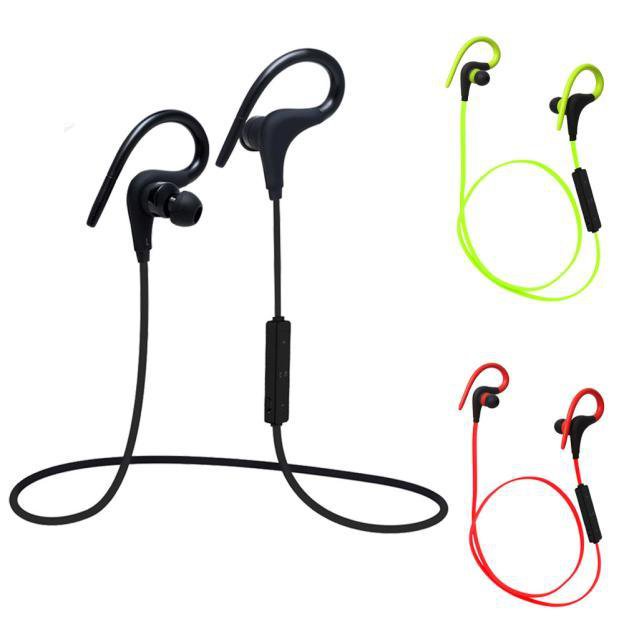
Wireless sports stereo sweat proof bluetooth headset - 3 colors
10 available
Details
Shipping: Australia: free (more destinations)
Condition: Brand new
*The store has not been updated recently. You may want to contact the merchant to confirm the availability of the product.


+ Free Worldwide Standard Shipping + Tracking number Provided + Secured Payments +
Color available : Black, red and green (LET A NOTE WHEN ORDERING) +All Products are New in their original packaging, never used and guaranteed+
The latest version V4.0+EDR Can connect two phones (one torr two) Bluetooth Headset & Hands-free, A2DP, AVRCP -92dBm RX sensitivity and +9dBm TX output power capability 24 bit Audio codec, -98dB SNR
KHz:20Hz-20KHz
lDC:5V/500MAH-1A Charging
time:last up to 2 hours
Distance: 10M
Support: A2DP/AVRCP Talk
time: 4-5 hours Play
music: 3-4 hours
Instructions:
Power: Press the power button for 2-3 seconds, along with red and blue lights, boot into the back even state Power
Pairing: Press the power button for 5-6 seconds, along with red and blue lights, after flashing red and blue alternately into pairing mode VOL
+: Press the volume + button for 2 seconds, add up the volume a maximum sound, a warning sound
VOL-: Press Volume - button for 2 seconds, cut down the volume a minimum sound, a warning sound.
Previous: Press VOL+
Next: Press VOL- Telephone
Answering: when to call, press the power button Refused to
answer: when to call, press the power button for 2 seconds Redial last telephone
number: double-click on the standby power button
Charging: red light when charging, fully blue lights How to Connect the Headphones with Your Cellphone(for the first
time): Open the Bluetooth function on your cell phone; Long press the headphones' answer button for 3 seconds. After hearing "power on" , don't release the button, continue to hold the button for 4 seconds. After a "beep" sound, when red and blue LED light flash alternately, it is turning into pairing mode. Use phone Bluetooth to find a Bluetooth device named "B3300", then select this device to pair. After pairing this device, Headphones will give a voice remind "connecting". Play music Long press the power/answer button, headphones will give a voice remind "Power off". No need to repeat all of above steps the next time to pair, you only need
to: Open the Bluetooth function on your cell phone; Short press the answer/power button, after hearing "power on", release the button, then you will hear "connecting". Just play music directly. Package
Content: 1 X Bluetooth headset 1 x USB charging cable 1 x User Manual
Product type: Headset
Please check carefully all characteristics and be sure that it fits with your material before ordering.
Product usually dispatched within 2 to 4 business days, Please, check our terms for Shipping delay Your Satisfaction is our goal , If you received the item earlier than expected, Please give us the correct feedback . If you have any question. Please DO NOT leave a negative feedback before contacting us. We will solve problem together, if any ... Ordering in our shop means that you are agree with our terms.
Color available : Black, red and green (LET A NOTE WHEN ORDERING) +All Products are New in their original packaging, never used and guaranteed+
The latest version V4.0+EDR Can connect two phones (one torr two) Bluetooth Headset & Hands-free, A2DP, AVRCP -92dBm RX sensitivity and +9dBm TX output power capability 24 bit Audio codec, -98dB SNR
KHz:20Hz-20KHz
lDC:5V/500MAH-1A Charging
time:last up to 2 hours
Distance: 10M
Support: A2DP/AVRCP Talk
time: 4-5 hours Play
music: 3-4 hours
Instructions:
Power: Press the power button for 2-3 seconds, along with red and blue lights, boot into the back even state Power
Pairing: Press the power button for 5-6 seconds, along with red and blue lights, after flashing red and blue alternately into pairing mode VOL
+: Press the volume + button for 2 seconds, add up the volume a maximum sound, a warning sound
VOL-: Press Volume - button for 2 seconds, cut down the volume a minimum sound, a warning sound.
Previous: Press VOL+
Next: Press VOL- Telephone
Answering: when to call, press the power button Refused to
answer: when to call, press the power button for 2 seconds Redial last telephone
number: double-click on the standby power button
Charging: red light when charging, fully blue lights How to Connect the Headphones with Your Cellphone(for the first
time): Open the Bluetooth function on your cell phone; Long press the headphones' answer button for 3 seconds. After hearing "power on" , don't release the button, continue to hold the button for 4 seconds. After a "beep" sound, when red and blue LED light flash alternately, it is turning into pairing mode. Use phone Bluetooth to find a Bluetooth device named "B3300", then select this device to pair. After pairing this device, Headphones will give a voice remind "connecting". Play music Long press the power/answer button, headphones will give a voice remind "Power off". No need to repeat all of above steps the next time to pair, you only need
to: Open the Bluetooth function on your cell phone; Short press the answer/power button, after hearing "power on", release the button, then you will hear "connecting". Just play music directly. Package
Content: 1 X Bluetooth headset 1 x USB charging cable 1 x User Manual
Product type: Headset
Please check carefully all characteristics and be sure that it fits with your material before ordering.
Product usually dispatched within 2 to 4 business days, Please, check our terms for Shipping delay Your Satisfaction is our goal , If you received the item earlier than expected, Please give us the correct feedback . If you have any question. Please DO NOT leave a negative feedback before contacting us. We will solve problem together, if any ... Ordering in our shop means that you are agree with our terms.


