$149.62
Add to Cart
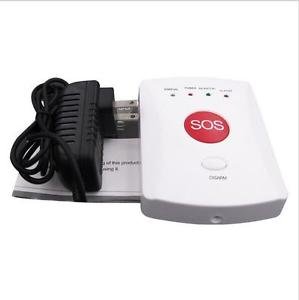
NSEE YL-007GE GSM Elderly Mobile SOS Emergency Call Alarm System Panic Button


More than 10 available
Details
Shipping: Australia: free (more destinations)
Sales Tax: check
Condition: Brand new
Returns: 30 days, buyer pays return shipping (more)
*The store has not been updated recently. You may want to contact the merchant to confirm the availability of the product.
Features:
Adopt GSM 850 900/1800/1900 bands, can be used all over the world.
Can per-set 5 phone numbers: when there is an alarm, it will call these numbers in order. Press DISARM button on the main panel, it will stop alarming.
Can per-set 5 SMS numbers: when there is an alarm, it will send SMS to these numbers.
Maximum 30 wireless sensors including wireless panic button or remote controllers, etc.
2 wired ports to connect wired sensors.
The SMS content of the first 5 wireless sensors can be edited by users.
Support remote listen in and two-way communication (connect an external speaker).
SMS alert for power failure or recovery.
Built-in backup rechargeable battery to keep working after power off.
Preparation for use
1. Insert SIM card in alarm system
Before inserting SIM card, please make sure:
--- Use a regular mobile phone to set PIN code request to off
--- Delete all stored numbers
--- Make sure there's enough balance in the card to work normally
Open the outside case of the alarm system and put the SIM card into the card slot (see picture).
Compatible with 2G networks only
2. Connect all devices needed
a. Connect the antenna
Screw the antenna to the unit carefully; do not over-tighten the screw or leave it too loose!
b. Connect the alarm siren (optional)
c. Connect the two-way intercom speaker (optional)
d. Connect wired sensors (optional)
3. Power
Plug in the power adaptor and turn on the backup battery switch.
The LED indicator will flash and the unit enters standby status.
Adopt GSM 850 900/1800/1900 bands, can be used all over the world.
Can per-set 5 phone numbers: when there is an alarm, it will call these numbers in order. Press DISARM button on the main panel, it will stop alarming.
Can per-set 5 SMS numbers: when there is an alarm, it will send SMS to these numbers.
Maximum 30 wireless sensors including wireless panic button or remote controllers, etc.
2 wired ports to connect wired sensors.
The SMS content of the first 5 wireless sensors can be edited by users.
Support remote listen in and two-way communication (connect an external speaker).
SMS alert for power failure or recovery.
Built-in backup rechargeable battery to keep working after power off.
Preparation for use
1. Insert SIM card in alarm system
Before inserting SIM card, please make sure:
--- Use a regular mobile phone to set PIN code request to off
--- Delete all stored numbers
--- Make sure there's enough balance in the card to work normally
Open the outside case of the alarm system and put the SIM card into the card slot (see picture).
Compatible with 2G networks only
2. Connect all devices needed
a. Connect the antenna
Screw the antenna to the unit carefully; do not over-tighten the screw or leave it too loose!
b. Connect the alarm siren (optional)
c. Connect the two-way intercom speaker (optional)
d. Connect wired sensors (optional)
3. Power
Plug in the power adaptor and turn on the backup battery switch.
The LED indicator will flash and the unit enters standby status.
You may also be interested in:
-
$54.56

-
$76.95

-
$11.19

-
$222.44

-
$173.48

-
$7.00

-
$14.30

-
$34.96

-
$13.81

-
$30.76