
$28.04
Add to Cart
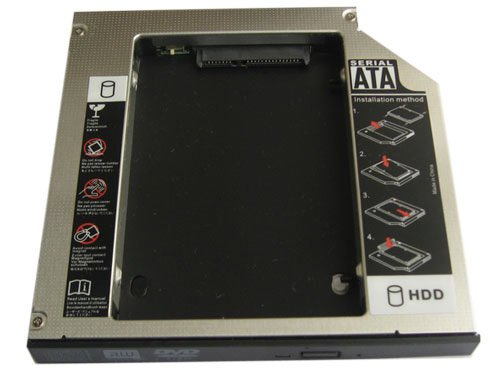
2nd HDD SSD hard drive caddy for Mac mini A1176 Macmini1,1 Macmini2,1
More than 10 available, 1 sold
Details
Shipping: Australia: $7.00 (more destinations)
Condition: Brand new
Brand New 12.7 mm SATA to IDE/PATA 2nd Hard drive Universal Caddy/Bay/Adapter
Dimensions:128.0(W)mmx12.7(H)mmx129.0(D)mm
Fit models:
Apple Mac mini A1176 Macmini1,1 Macmini2,1
Apple Mac mini 1.83Ghz (Mid 2007) A1176, MB138LL/A, Combo Drive, 661-3887, 678-0508M, 661-4442
Please note, that this is a standard hd-caddy.
It has a flat faceplate at comes without any extra accessories such as Bracket etc.
If necessary please use this parts from your optical drive.
2.5"HDD Interface: SATA
Laptop/ Mother Board Interface: IDE/PATA
1. Fast & Reliable connection, just as the primary HDD
2. Fully integrated into laptop, no cables/PSU/software driver needed
3. Dual boot, Support installation of 2nd operating system on the 2nd HDD and boot selection
Installation steps:
1. Unpack the hard drive, lift the hard drive dacaddy retaining latch, then screws to the hard drive.
2. Insert the hard drive into the hard drive caddy.
3. Slide the hard drive into the connector until it locks into place.
4. Lower the hard drive caddy retaining latch until it snaps closed.
Package Content:
1 X SATA 2nd HDD Caddy for SATA notebook HDD (2.5" HDD)
Dimensions:128.0(W)mmx12.7(H)mmx129.0(D)mm
Fit models:
Apple Mac mini A1176 Macmini1,1 Macmini2,1
Apple Mac mini 1.83Ghz (Mid 2007) A1176, MB138LL/A, Combo Drive, 661-3887, 678-0508M, 661-4442
Please note, that this is a standard hd-caddy.
It has a flat faceplate at comes without any extra accessories such as Bracket etc.
If necessary please use this parts from your optical drive.
2.5"HDD Interface: SATA
Laptop/ Mother Board Interface: IDE/PATA
1. Fast & Reliable connection, just as the primary HDD
2. Fully integrated into laptop, no cables/PSU/software driver needed
3. Dual boot, Support installation of 2nd operating system on the 2nd HDD and boot selection
Installation steps:
1. Unpack the hard drive, lift the hard drive dacaddy retaining latch, then screws to the hard drive.
2. Insert the hard drive into the hard drive caddy.
3. Slide the hard drive into the connector until it locks into place.
4. Lower the hard drive caddy retaining latch until it snaps closed.
Package Content:
1 X SATA 2nd HDD Caddy for SATA notebook HDD (2.5" HDD)


 CN, Guangdong
