
$25.79
Add to Cart
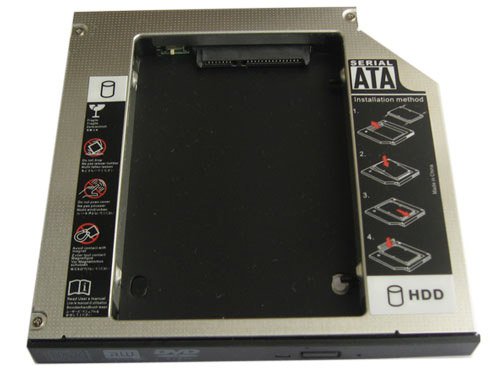
SATA 2nd HDD SSD hard drive caddy For Fujitsu LifeBook E8310 E8410 C1410 C1321
More than 10 available, 2 sold
Details
Shipping: Australia: $792.00 (more destinations)
Condition: Brand new
Brand New 12.7mm SATA to IDE/PATA 2nd Hard drive Universal Caddy/Bay/Adapter
Dimensions:128.0(W)mmx12.7(H)mmx129.0(D)mm
Fit models:
Fujitsu LifeBook E8310 E8410 C1410 C1321
LifeBook S2110
LifeBook S2210
LifeBook S6230
LifeBook S6240
LifeBook S6311
LifeBook S6310
LifeBook S7111
LifeBook S7110
LifeBook P7210
LifeBook T4020
LifeBook T4210
LifeBook T4215
LifeBook T4220
LifeBook E8110
LifeBook E8210
LifeBook E8310
LifeBook E8410
LifeBook C1410
LifeBook C1321
2.5"HDD Interface: SATA
Laptop/ Mother Board Interface: IDE/PATA
1. Fast & Reliable connection, just as the primary HDD
2. Fully integrated into laptop, no cables/PSU/software driver needed
3. Dual boot, Support installation of 2nd operating system on the 2nd HDD and boot selection
Installation steps:
1. Unpack the hard drive, lift the hard drive dacaddy retaining latch, then screws to the hard drive.
2. Insert the hard drive into the hard drive caddy.
3. Slide the hard drive into the connector until it locks into place.
4. Lower the hard drive caddy retaining latch until it snaps closed.
Package Content:
1 X SATA 2nd HDD Caddy for SATA notebook HDD (2.5" HDD)
Dimensions:128.0(W)mmx12.7(H)mmx129.0(D)mm
Fit models:
Fujitsu LifeBook E8310 E8410 C1410 C1321
LifeBook S2110
LifeBook S2210
LifeBook S6230
LifeBook S6240
LifeBook S6311
LifeBook S6310
LifeBook S7111
LifeBook S7110
LifeBook P7210
LifeBook T4020
LifeBook T4210
LifeBook T4215
LifeBook T4220
LifeBook E8110
LifeBook E8210
LifeBook E8310
LifeBook E8410
LifeBook C1410
LifeBook C1321
2.5"HDD Interface: SATA
Laptop/ Mother Board Interface: IDE/PATA
1. Fast & Reliable connection, just as the primary HDD
2. Fully integrated into laptop, no cables/PSU/software driver needed
3. Dual boot, Support installation of 2nd operating system on the 2nd HDD and boot selection
Installation steps:
1. Unpack the hard drive, lift the hard drive dacaddy retaining latch, then screws to the hard drive.
2. Insert the hard drive into the hard drive caddy.
3. Slide the hard drive into the connector until it locks into place.
4. Lower the hard drive caddy retaining latch until it snaps closed.
Package Content:
1 X SATA 2nd HDD Caddy for SATA notebook HDD (2.5" HDD)


 CN, Guangdong
