
$716.50
Add to Cart
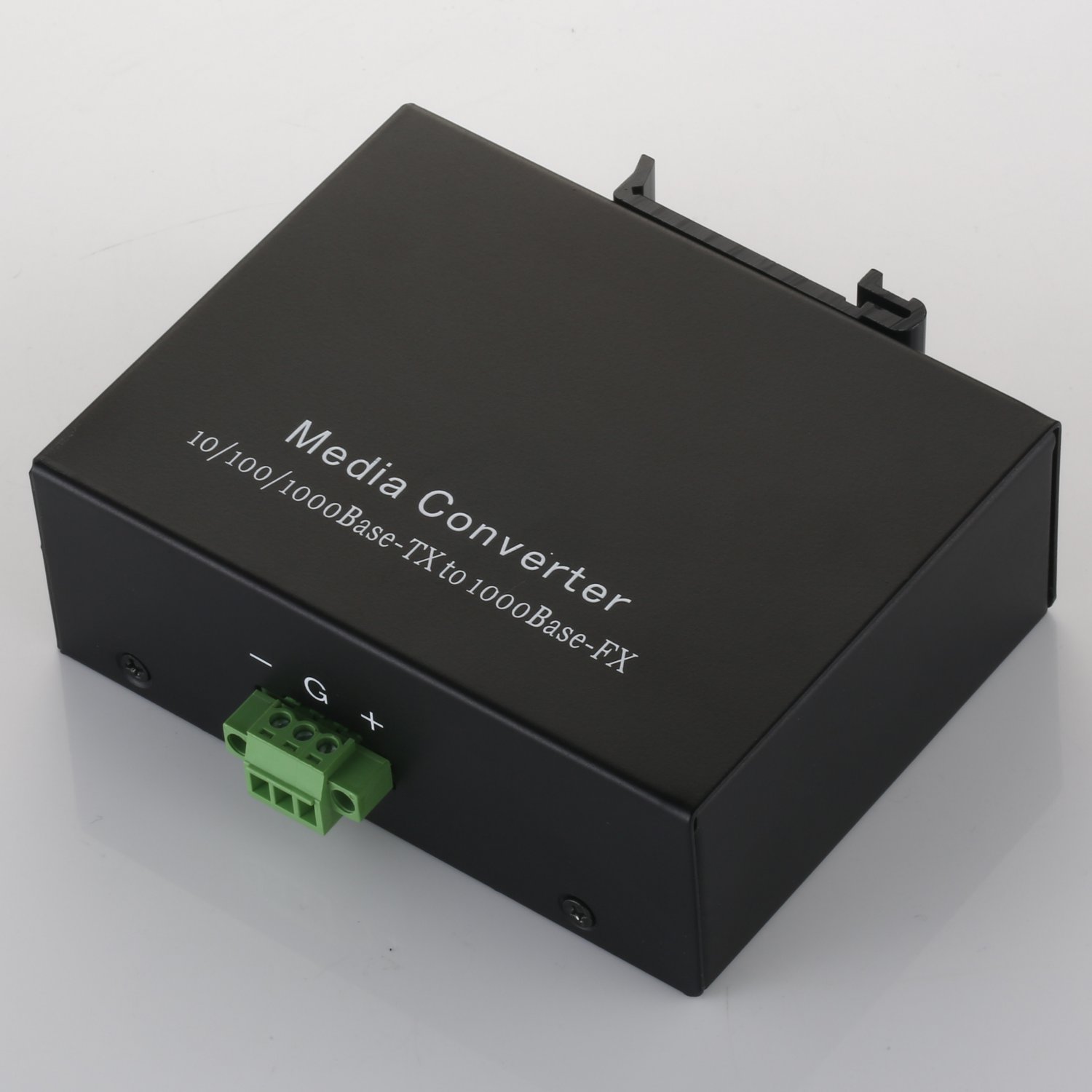
Industrial Gigabit Ethernet Media Converter
More than 10 available
Details
Shipping: Australia: $5.00 (more destinations)
Condition: Brand new
*The store has not been updated recently. You may want to contact the merchant to confirm the availability of the product.


1.Overview
IEEE802.3z/AB 1000Mbps Industrial Gigabit Ethernet Media Converter supports two types media for network connection such as 10/100/1000Base-T and 1000Base-SX/LX
(SFP). The media converter is designed with a switch controller and buffer memory that connects two types segments to operate smoothly. It provides good stability and reliability.
2. Checklist
Before you installing the Converter, verify that the package contains the following:
1. The TP-SFP Media converter.
2. This User’s Manual.
Piease notify your sales representative immediately if any of the aforementioned items is missing or damaged.
3. LED Description
There are six LED At Front View of Gigabit Media Converter
TP 100 Lit when TP speed is 100Mbps
TP 1000 Lit when TP speed is 1000Mbps
TP Act Lit when TP connection is good.
Blinks when TP data is transmitting.
TP FDX Lit when TP full-duplex mode is active.Off when TP half-duplex mode is active. Blinks when collision signal is present.
FX Act Lit when TP connection is good.
Blinks when TP data is transmitting.
PWR Lit when +5V power is coming up.
4. SFP Technical Specifications
1000Base-SX 1000Base-LX-20
Connector type LC LC
Fiber type Multi-mode Single-mode
Wavelength 850nm 1310nm
Max Distance 62.5µm: 224m
50µm: 550m 10Km
Min TX PWR -11.0dBm -10.0dBm
Max TX PWR -6.0dBm -5.0dBm
Sensitivity < -18dBm < -23dBm
Link Budget 7.0dBm 13.0dBm
1000Base-LX-40 1000Base-HX
Connector type LC LC
Fiber type Single-mode Single-mode
Wavelength 1550nm 1550nm
Max Distance 40Km 70Km
Min TX PWR -8.0dBm -5.0dBm
Max TX PWR -3.0dBm 0dBm
Sensitivity < -25dBm < -26dBm
Link Budget 17.0dBm 21.0dBm
5. Installing the SFP Converter
1. Attach a SFP to SFP Cage on the Converter.
2. Attach fiber cable from the SFP on the Converter to the fiber network.. The fiber connections must be matched: transmit socket to receive socket.
3. Attach a UTP cable from the TP network device to the RJ45 port on the Converter.
4. Connect the power cord to the Converter and check that the Power LED lights up. The TP Act and FX Act LEDs will light when all the cable connections satisfactory.
6. Technical Specifications
The Converter conforms to the following standards:
Standerds: IEEE 802.3z/AB 10/1001000Base-T
1000Base-SX/LX/HX
UTP Cable: Cat.5e or Cat.6 cable up to 100m.
Fiber Cable:
1000SX: 50/125,62.5/125µm molti-mode
1000LX/HX: 9/125µm single-mode.
Data Transfer Rate:
2000Mbps for full-duplex at 1000Mbps speed.
LED Indicators:
TP Act, Fdx, 100, 1000, FX Link/Act, Power
TP Flow Control: NWay auto-negotiation
Fiber Flow Control: NWay at full-duplex mode
Power Requirement: 7.5-40VDC
Operating Temperature: -30 ~ 75℃
Storage Temperature: -40~ 85℃
Humidity: 5% ~ 90% non-condensing
dimensions:35×74×94mm(H×W×D)
IEEE802.3z/AB 1000Mbps Industrial Gigabit Ethernet Media Converter supports two types media for network connection such as 10/100/1000Base-T and 1000Base-SX/LX
(SFP). The media converter is designed with a switch controller and buffer memory that connects two types segments to operate smoothly. It provides good stability and reliability.
2. Checklist
Before you installing the Converter, verify that the package contains the following:
1. The TP-SFP Media converter.
2. This User’s Manual.
Piease notify your sales representative immediately if any of the aforementioned items is missing or damaged.
3. LED Description
There are six LED At Front View of Gigabit Media Converter
TP 100 Lit when TP speed is 100Mbps
TP 1000 Lit when TP speed is 1000Mbps
TP Act Lit when TP connection is good.
Blinks when TP data is transmitting.
TP FDX Lit when TP full-duplex mode is active.Off when TP half-duplex mode is active. Blinks when collision signal is present.
FX Act Lit when TP connection is good.
Blinks when TP data is transmitting.
PWR Lit when +5V power is coming up.
4. SFP Technical Specifications
1000Base-SX 1000Base-LX-20
Connector type LC LC
Fiber type Multi-mode Single-mode
Wavelength 850nm 1310nm
Max Distance 62.5µm: 224m
50µm: 550m 10Km
Min TX PWR -11.0dBm -10.0dBm
Max TX PWR -6.0dBm -5.0dBm
Sensitivity < -18dBm < -23dBm
Link Budget 7.0dBm 13.0dBm
1000Base-LX-40 1000Base-HX
Connector type LC LC
Fiber type Single-mode Single-mode
Wavelength 1550nm 1550nm
Max Distance 40Km 70Km
Min TX PWR -8.0dBm -5.0dBm
Max TX PWR -3.0dBm 0dBm
Sensitivity < -25dBm < -26dBm
Link Budget 17.0dBm 21.0dBm
5. Installing the SFP Converter
1. Attach a SFP to SFP Cage on the Converter.
2. Attach fiber cable from the SFP on the Converter to the fiber network.. The fiber connections must be matched: transmit socket to receive socket.
3. Attach a UTP cable from the TP network device to the RJ45 port on the Converter.
4. Connect the power cord to the Converter and check that the Power LED lights up. The TP Act and FX Act LEDs will light when all the cable connections satisfactory.
6. Technical Specifications
The Converter conforms to the following standards:
Standerds: IEEE 802.3z/AB 10/1001000Base-T
1000Base-SX/LX/HX
UTP Cable: Cat.5e or Cat.6 cable up to 100m.
Fiber Cable:
1000SX: 50/125,62.5/125µm molti-mode
1000LX/HX: 9/125µm single-mode.
Data Transfer Rate:
2000Mbps for full-duplex at 1000Mbps speed.
LED Indicators:
TP Act, Fdx, 100, 1000, FX Link/Act, Power
TP Flow Control: NWay auto-negotiation
Fiber Flow Control: NWay at full-duplex mode
Power Requirement: 7.5-40VDC
Operating Temperature: -30 ~ 75℃
Storage Temperature: -40~ 85℃
Humidity: 5% ~ 90% non-condensing
dimensions:35×74×94mm(H×W×D)
You may also be interested in:
-
$14.32
-
$14.32
-
$286.83
-
$201.19
-
$733.58
-
$638.66
-
$1,791.25

-
$42.98
-
$49.57
-
$140.32


 CN, Guangdong
