
$31.49
On Hold
HP Pavilion dv7-2040us Laptop CPU Cooling Fan
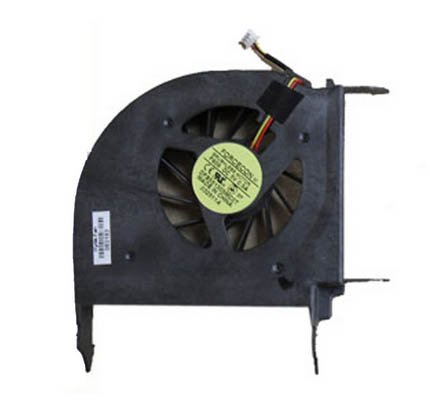
Product Introduction:
Laptop Model Number: Pavilion dv7-2040us
Manufacturer Part Number: 516876-001
1. Condition: 100% New.
2. New high quality CPU Fan.
3. The HP Pavilion dv7-2040us CPU cooling fan features efficient heat dissipation and low noise, perfect design for high compatibility and excellent compone
4. You can work as long as you like without overheating your computer
5. Keep your computer cool and comfortable on your lap or at your desk with this CPU fan
6. Equivalent Replacement Part,Low thermal noise and can help reduce heat.
Package Contents:
1x New CPU Fan for HP Pavilion dv7-2040us
1 Turn off your laptop before starting the repair process of the fan.
2 Access your laptop fan by removing the cover that protects it. Use a small Phillips screwdriver to remove the screws that hold the cover and then lift the cover off, revealing the fan inside.
3 Inspect the look and the condition of the broken fan. If the damage is too severe, it might be best to replace the whole fan and not just the broken blades.
4 Clean the inside of the fan and around it as well, using a can of compressed air. Notice how lint, dirt and dust accumulate around the fan and other inside components. Remove all dust and lint with canned air, making sure there is no residue near the fan.
5 Re-install the case cover of the fan by tightening the screws with a Phillips head screwdriver. Reinstall the laptop fan cover as well, making sure to put everything on the same place as before.
Tips & Warnings
Laptop components are very sensitive to cold, heat and jarring. Be careful not to hit, bump or drop any of the components while replacing the fan.
Never cover the fan vent when using a laptop. Clothes, blankets and pillows blocking the vent will cause the fan to stop working. If you run your laptop for an extended period of time without a fan, permanent damage may occur.
Laptop Model Number: Pavilion dv7-2040us
Manufacturer Part Number: 516876-001
1. Condition: 100% New.
2. New high quality CPU Fan.
3. The HP Pavilion dv7-2040us CPU cooling fan features efficient heat dissipation and low noise, perfect design for high compatibility and excellent compone
4. You can work as long as you like without overheating your computer
5. Keep your computer cool and comfortable on your lap or at your desk with this CPU fan
6. Equivalent Replacement Part,Low thermal noise and can help reduce heat.
Package Contents:
1x New CPU Fan for HP Pavilion dv7-2040us
1 Turn off your laptop before starting the repair process of the fan.
2 Access your laptop fan by removing the cover that protects it. Use a small Phillips screwdriver to remove the screws that hold the cover and then lift the cover off, revealing the fan inside.
3 Inspect the look and the condition of the broken fan. If the damage is too severe, it might be best to replace the whole fan and not just the broken blades.
4 Clean the inside of the fan and around it as well, using a can of compressed air. Notice how lint, dirt and dust accumulate around the fan and other inside components. Remove all dust and lint with canned air, making sure there is no residue near the fan.
5 Re-install the case cover of the fan by tightening the screws with a Phillips head screwdriver. Reinstall the laptop fan cover as well, making sure to put everything on the same place as before.
Tips & Warnings
Laptop components are very sensitive to cold, heat and jarring. Be careful not to hit, bump or drop any of the components while replacing the fan.
Never cover the fan vent when using a laptop. Clothes, blankets and pillows blocking the vent will cause the fan to stop working. If you run your laptop for an extended period of time without a fan, permanent damage may occur.


 CN, guang xi
