
$264.87
Add to Cart
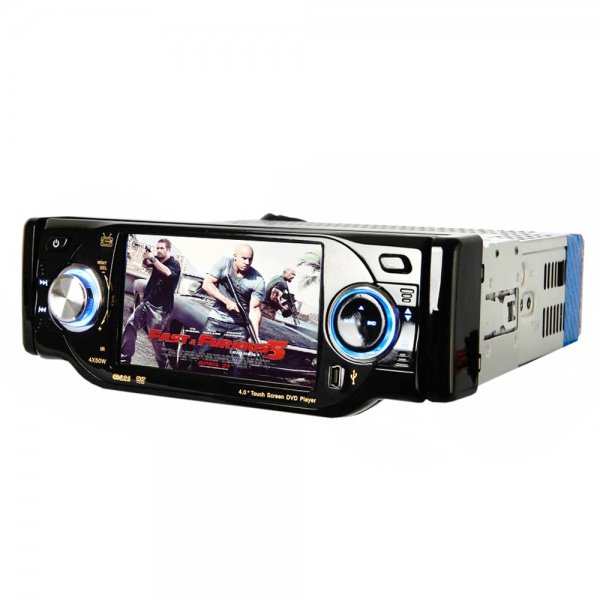
DA-4001 4" Signal Din Bluetooth Touch Screen Car DVD Player
More than 10 available
Details
Shipping: Australia: free (more destinations)
Condition: Brand new
*The store has not been updated recently. You may want to contact the merchant to confirm the availability of the product.
DA-4001 4" Signal Din Bluetooth Touch Screen Car DVD Player is in new condition. It is equipped with high-quality colorful LCD, built-in DVD, FM, AM, TV, port for backup rear-view mirror,dual-channel independent audio outputs etc, having various advantages such as intgrated entertains, simple installation, convenient connection, low energy consumption, no flash,broad angle of view, real color and modest light difference, is applicable to many type of vehicles. Useful and practical, best choice for you!
Features
New and high quality
4" touch screen with TFT LCD, Panel with up and down rotation
Function of automatic storage and memory
Full automatic PAL / SECAM / NTSC complete system identification with good compatibility
Standard 60W x 4 speaker power output for vehicle
Full function remote control with infrared ray to ensure the operation safe in panel's failure
Global-area AM / FM radio
Night-brightness automatic adjustment mode: screen would be automatically illuminated by small bulb to reduce light difference in night drive if the mode is activated
Signal receiving select: two-way video output, audio output with left and right sides
Picture mode select: LCD preset mode to guarantee the fast adjustment for picture quality
Bluetooth function: system would be automatically silenced to answer when there is a coming call
USB ports in front of panel, and double SD slot inside
Support GPS function
Only compatible with 12 CM disc
Specifications
FM:
FM Frequency 80.5~108.0MHz
Service Sensitivity 7dB
Noise-signal Ratio 65dB (1 KHz, 0dB)
Out-of-service Sensitivity 23dB
Separation Degree 32dB
Frequency Response 40Hz~16KHz
Medium Frequency 10.7 MHz
AM:
FM Frequency 522~1620MHz
Service Sensitivity 28dB
Noise-signal Ratio 45dB (1KHz, 0dB)
Out-of-service Sensitivity 45dB
Separation Degree 32dB
Frequency Response 40Hz~16KHz
Medium Frequency 450MHz
DVD
Video Standard Auto NTSC / PAL
Sound Channel Dual-channel
Signal-sound Ratio 75dB (1 KHz, 0dB)
Frequency Response 40Hz~16KHz
Separation Degree 55dB
Dynamic Range 80dB
Distortion Degree 0.40%
VCD/CD
Video Standard Auto NTSC / PAL
Sound Channel Dual-channel
Signal-sound Ratio 75dB (1 KHz, 0dB)
Frequency Response 40Hz~16KHz
Separation Degree 55dB
Dynamic Range 80dB
Distortion Degree 0.40%
Others:
Voltage DC-10~15V
Load 4 Ω
Maxiumum Power Output 60Wx4
Volume Control ±7dB
Output Interface Audio: dual-channel independent input; Video: compound signal (AV) output
Input interface Audio: dual-channel independent input; Video: compound signal (AV) output
Video characteristic Video amplitude: 1.0VP-P (load of 75Ω); Frequency characteristic: 20-20Khz (± 1dB)
Dimension 185 x 180 x 70 mm
Using Temperature -10℃ ~ 60℃
Using Humidity 15~75%
Warranty 1 Year
Package Includes
1 x DA-4001 4" Signal Din Bluetooth Touch Screen Car DVD Player
1 x Power Cable
1 x Remote Controller
1 x USB Cable
1 x Microphone
1 x Stylus
1 x CR2025 Battery (for Remote Controller)
1 x Installation Accessories
Extra Info
FAQ
Q1: Automatically reset when shut it down
Reason: Incorrect connection between ACC and B+ line
Solution: Please check and correct the connecting line between ACC and B+ line
Q2: Fail to start the device
Reason: The system power or the car fuse is fusing, the voltage exceeds the rated voltage and the system offers auto protection
Solution: Get professional help to change the fuse with correct model, adjust the voltage and reset system by pressing the reset key on the panel.
Q3: Too bark screen or black screen
Reason: The front big light is usually used, and there is some problem about the machine system.
Solution: turn off the car big light, lightly click the reset key on the panel to system reset
Q4: The panel buttons are not functional
Reason: Some button of the panel is blocked
Solution: Check the buttons of the panel
Q5: no image but sound, warming picture appears
Reason: The screen goes into dormant state, braking controlling is not connect
Solution: Just click the touch screen, check if the braking detection line is matched with an error.
Q6: Too high volume at starting up
Reason: bad settings by user
Solution: Adjust the volume knob to the appointed, immediately long press all in one key SMART DIAL with 5 seconds, the needed volume number can be locked
Q7: The touch screen function is not good
Reason: Not correct the touch screen
Solution: Press the MENUE, go into the main menu-go into other setting options-choose the touch screen to correct, according to the screen, click the white point one by one
Q8: Disks can't be played normally
Reason: the grade of the disk exceeds the grade set of the locking functions, disk region codes are incompatible because the disk is put on the reverse side.
Solution: Adjust the setting grade of locking function, use the compatible disk with the car DVD, keep the side with label upward when insert the disk
Q9: The disk can't be put in.
Reason: There has been some disk in the DVD
Solution: exit the disk in the DVD and put a new one
Q10: The interruption in the process of reading a disk
Reason: The disk is dirt or scratched, the files or the records are damaged
Solution: clean or exchange disk
Q11: Can not switch sound track during playing a disk
Reason: bad setting
Solution: At playing the disk, if the audio set is at 5.1 sound track, the sound track can't be switched, click the top left of the screen to go into the audio setting of the main menu, and switch the 5.1 sound track to the stereo 2 sound track.
Q12:Can not go into GPS navigation
Solution: Check if the GPS map card has a poor contact, suggest pulling out the SD card under the circumstance of power off.
Q13: GPS function without satellite network can't fix positions.
Solution: Check if the end of the GPS receiving antenna is connected with the DVD normally, if the car is stamped with blow-out disc recently, because the material of the blow-out disc may cause signal attenuation further to affect positioning, moreover, check if the antenna lead has any damaged.
Features
New and high quality
4" touch screen with TFT LCD, Panel with up and down rotation
Function of automatic storage and memory
Full automatic PAL / SECAM / NTSC complete system identification with good compatibility
Standard 60W x 4 speaker power output for vehicle
Full function remote control with infrared ray to ensure the operation safe in panel's failure
Global-area AM / FM radio
Night-brightness automatic adjustment mode: screen would be automatically illuminated by small bulb to reduce light difference in night drive if the mode is activated
Signal receiving select: two-way video output, audio output with left and right sides
Picture mode select: LCD preset mode to guarantee the fast adjustment for picture quality
Bluetooth function: system would be automatically silenced to answer when there is a coming call
USB ports in front of panel, and double SD slot inside
Support GPS function
Only compatible with 12 CM disc
Specifications
FM:
FM Frequency 80.5~108.0MHz
Service Sensitivity 7dB
Noise-signal Ratio 65dB (1 KHz, 0dB)
Out-of-service Sensitivity 23dB
Separation Degree 32dB
Frequency Response 40Hz~16KHz
Medium Frequency 10.7 MHz
AM:
FM Frequency 522~1620MHz
Service Sensitivity 28dB
Noise-signal Ratio 45dB (1KHz, 0dB)
Out-of-service Sensitivity 45dB
Separation Degree 32dB
Frequency Response 40Hz~16KHz
Medium Frequency 450MHz
DVD
Video Standard Auto NTSC / PAL
Sound Channel Dual-channel
Signal-sound Ratio 75dB (1 KHz, 0dB)
Frequency Response 40Hz~16KHz
Separation Degree 55dB
Dynamic Range 80dB
Distortion Degree 0.40%
VCD/CD
Video Standard Auto NTSC / PAL
Sound Channel Dual-channel
Signal-sound Ratio 75dB (1 KHz, 0dB)
Frequency Response 40Hz~16KHz
Separation Degree 55dB
Dynamic Range 80dB
Distortion Degree 0.40%
Others:
Voltage DC-10~15V
Load 4 Ω
Maxiumum Power Output 60Wx4
Volume Control ±7dB
Output Interface Audio: dual-channel independent input; Video: compound signal (AV) output
Input interface Audio: dual-channel independent input; Video: compound signal (AV) output
Video characteristic Video amplitude: 1.0VP-P (load of 75Ω); Frequency characteristic: 20-20Khz (± 1dB)
Dimension 185 x 180 x 70 mm
Using Temperature -10℃ ~ 60℃
Using Humidity 15~75%
Warranty 1 Year
Package Includes
1 x DA-4001 4" Signal Din Bluetooth Touch Screen Car DVD Player
1 x Power Cable
1 x Remote Controller
1 x USB Cable
1 x Microphone
1 x Stylus
1 x CR2025 Battery (for Remote Controller)
1 x Installation Accessories
Extra Info
FAQ
Q1: Automatically reset when shut it down
Reason: Incorrect connection between ACC and B+ line
Solution: Please check and correct the connecting line between ACC and B+ line
Q2: Fail to start the device
Reason: The system power or the car fuse is fusing, the voltage exceeds the rated voltage and the system offers auto protection
Solution: Get professional help to change the fuse with correct model, adjust the voltage and reset system by pressing the reset key on the panel.
Q3: Too bark screen or black screen
Reason: The front big light is usually used, and there is some problem about the machine system.
Solution: turn off the car big light, lightly click the reset key on the panel to system reset
Q4: The panel buttons are not functional
Reason: Some button of the panel is blocked
Solution: Check the buttons of the panel
Q5: no image but sound, warming picture appears
Reason: The screen goes into dormant state, braking controlling is not connect
Solution: Just click the touch screen, check if the braking detection line is matched with an error.
Q6: Too high volume at starting up
Reason: bad settings by user
Solution: Adjust the volume knob to the appointed, immediately long press all in one key SMART DIAL with 5 seconds, the needed volume number can be locked
Q7: The touch screen function is not good
Reason: Not correct the touch screen
Solution: Press the MENUE, go into the main menu-go into other setting options-choose the touch screen to correct, according to the screen, click the white point one by one
Q8: Disks can't be played normally
Reason: the grade of the disk exceeds the grade set of the locking functions, disk region codes are incompatible because the disk is put on the reverse side.
Solution: Adjust the setting grade of locking function, use the compatible disk with the car DVD, keep the side with label upward when insert the disk
Q9: The disk can't be put in.
Reason: There has been some disk in the DVD
Solution: exit the disk in the DVD and put a new one
Q10: The interruption in the process of reading a disk
Reason: The disk is dirt or scratched, the files or the records are damaged
Solution: clean or exchange disk
Q11: Can not switch sound track during playing a disk
Reason: bad setting
Solution: At playing the disk, if the audio set is at 5.1 sound track, the sound track can't be switched, click the top left of the screen to go into the audio setting of the main menu, and switch the 5.1 sound track to the stereo 2 sound track.
Q12:Can not go into GPS navigation
Solution: Check if the GPS map card has a poor contact, suggest pulling out the SD card under the circumstance of power off.
Q13: GPS function without satellite network can't fix positions.
Solution: Check if the end of the GPS receiving antenna is connected with the DVD normally, if the car is stamped with blow-out disc recently, because the material of the blow-out disc may cause signal attenuation further to affect positioning, moreover, check if the antenna lead has any damaged.
Other Products from ezwayz (View All)
-
$306.69
-
$118.48
-
$104.54

-
$97.57

-
$146.37
-
$174.25
-
$125.46

-
$236.98

-
$167.28

-
$146.37


