
$1,098.21
Add to Cart
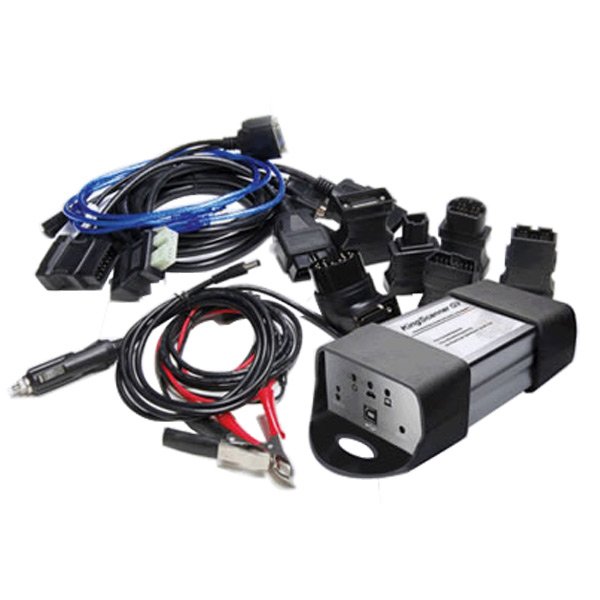
King Scanner G3 for Toyota Tis and Honda Him Top Quality
More than 10 available
Details
Shipping: Australia: $137.00 (more destinations)
Condition: Brand new
*The store has not been updated recently. You may want to contact the merchant to confirm the availability of the product.
King scanner g3 for Toyota Tis and Honda Him
Item Description:
1) King scanner G3 Combines Original Toyota Tis & Honda Him:
1) Reprogramming for all Honda vehicles
2) Reprogramming for all Toyota vehicles
2. King Scanner Tool Software Version:
1) For Honda Ver 2.013.019
2) For Toyota: Ver 4.21.002 / 5.00.028
Functions:
1. Scan tool Diagnosis
(1) All Toyota vehicles—achieve all functions of original Toyota TIS Techstream
(2) All Honda vehicles—achieve all functions of original Honda HIM
(3) Universal functions—Read fault code, data stream, and Do dynamic test, etc
2. Vehicle Programming:
(1)All Toyota vehicles—achieve all functions of original TIS Techstream
(2)All Honda vehicles—achieve all functions of original Honda HIM
3. Immobilizer:
(1) All Toyota vehicles—achieve all functions of original TIS Techstream
(2) All Honda vehicles—achieve all functions of original Honda HIM
4. Great Advantages:
(1) Not only professional, but also universal
King scanner G3 can diagnose other vehicles(like BENZ, BMW, AUDI,KIA)well in some functions, e.g. reading & erasing trouble code, reading dynamic date stream, component testing, matching diagnosis of reactive.
(2) Continuous test before on sale
King scanner G3 has been tested again and again to make sure it will be always stable and practicable.
(3) Ongoing Improvement (More original software soon)
A qualified R&D engineer’s team is always trying to improve the software all the time to meet the lasting demands of the aftermarket.
Specifications:
1. Hardware Introduction
1) Reset Button-Reset Firmware; 2) Diagnostic Socket-Connect with Cars through DLC ;3) USB Socket-Connect with Laptop through USB Cable; 4) Power Led(Red)-Indicate Power status; 5) Vehicle Led(Yellow)-VCX/Vehicle Communication status; 6 )Computer Led(Green)-Computer/Firmware Communication Status.
2. Operation Condition
King scanner G3 needs to connect with PC to realize diagnostic and other functions, the PC has to meet the following requirements:
1) Processor: Pentium3/1GHz or higher
2) Memory: 256MB or higher
3) Hard Disc: 40G or higher
4) Display: Resolution 800X600 or higher
5) Operation system: Windows XP or Windows 7.
3. King Scanner g3 Installation
1). HIM Installation:
Step 1 Find the Setup file in the CD-ROM.
Step 2 Double click the icon to install the software.
Step 3 Click [Next]
Step 4 Click [Yes]
Step 5 Choose one, then click [Next]
Step 6 Enter the number, then Click [Next]
Step 7 Select the language, then Click [Next]
Being Installed
Step 8 Installation finished, click [Finish]
HIM shortcut icon will display on the desktop after successful installation.
2). TIS Installation
Step 1 Double click the icon to run the software
Step 2 Choose languages, and then click [Next]
Step 3 Click [Next]
Step 4 Input user information, then click [Next]
Step 5 Click [Install]
Setup Status
Step 6 Installation completed, Click [Finish]
TIS shortcut icon will display on the desktop after successful installation.
Software Display:
Package Including:
1. King scanner Multiplexer
2. BMW 20-Pin Cable
3. AUDI 4-Pin Cable
4. BENZ 38-Pin Cable
5. Toyota 17-Pin Adapter
6. Toyota 22-Pin Adapter
7. Honda 3-Pin Adapter
8. Mitsubishi/Hyundai 12+16 Pin Cable
9. Nissan 14+16 Pin Adapter
10. OBD II King scanner (For King scanner software)
11. OBD II Can Bus (For Toyota and Honda)
12. KIA 20-Pin Adapter
13. Main Cable
14. Battery Clips
15. Ignition Lighter Cable
16. USD Line
17. Storage Case
18. CD (King scanner +TIS, HIM software)
Item Description:
1) King scanner G3 Combines Original Toyota Tis & Honda Him:
1) Reprogramming for all Honda vehicles
2) Reprogramming for all Toyota vehicles
2. King Scanner Tool Software Version:
1) For Honda Ver 2.013.019
2) For Toyota: Ver 4.21.002 / 5.00.028
Functions:
1. Scan tool Diagnosis
(1) All Toyota vehicles—achieve all functions of original Toyota TIS Techstream
(2) All Honda vehicles—achieve all functions of original Honda HIM
(3) Universal functions—Read fault code, data stream, and Do dynamic test, etc
2. Vehicle Programming:
(1)All Toyota vehicles—achieve all functions of original TIS Techstream
(2)All Honda vehicles—achieve all functions of original Honda HIM
3. Immobilizer:
(1) All Toyota vehicles—achieve all functions of original TIS Techstream
(2) All Honda vehicles—achieve all functions of original Honda HIM
4. Great Advantages:
(1) Not only professional, but also universal
King scanner G3 can diagnose other vehicles(like BENZ, BMW, AUDI,KIA)well in some functions, e.g. reading & erasing trouble code, reading dynamic date stream, component testing, matching diagnosis of reactive.
(2) Continuous test before on sale
King scanner G3 has been tested again and again to make sure it will be always stable and practicable.
(3) Ongoing Improvement (More original software soon)
A qualified R&D engineer’s team is always trying to improve the software all the time to meet the lasting demands of the aftermarket.
Specifications:
1. Hardware Introduction
1) Reset Button-Reset Firmware; 2) Diagnostic Socket-Connect with Cars through DLC ;3) USB Socket-Connect with Laptop through USB Cable; 4) Power Led(Red)-Indicate Power status; 5) Vehicle Led(Yellow)-VCX/Vehicle Communication status; 6 )Computer Led(Green)-Computer/Firmware Communication Status.
2. Operation Condition
King scanner G3 needs to connect with PC to realize diagnostic and other functions, the PC has to meet the following requirements:
1) Processor: Pentium3/1GHz or higher
2) Memory: 256MB or higher
3) Hard Disc: 40G or higher
4) Display: Resolution 800X600 or higher
5) Operation system: Windows XP or Windows 7.
3. King Scanner g3 Installation
1). HIM Installation:
Step 1 Find the Setup file in the CD-ROM.
Step 2 Double click the icon to install the software.
Step 3 Click [Next]
Step 4 Click [Yes]
Step 5 Choose one, then click [Next]
Step 6 Enter the number, then Click [Next]
Step 7 Select the language, then Click [Next]
Being Installed
Step 8 Installation finished, click [Finish]
HIM shortcut icon will display on the desktop after successful installation.
2). TIS Installation
Step 1 Double click the icon to run the software
Step 2 Choose languages, and then click [Next]
Step 3 Click [Next]
Step 4 Input user information, then click [Next]
Step 5 Click [Install]
Setup Status
Step 6 Installation completed, Click [Finish]
TIS shortcut icon will display on the desktop after successful installation.
Software Display:
Package Including:
1. King scanner Multiplexer
2. BMW 20-Pin Cable
3. AUDI 4-Pin Cable
4. BENZ 38-Pin Cable
5. Toyota 17-Pin Adapter
6. Toyota 22-Pin Adapter
7. Honda 3-Pin Adapter
8. Mitsubishi/Hyundai 12+16 Pin Cable
9. Nissan 14+16 Pin Adapter
10. OBD II King scanner (For King scanner software)
11. OBD II Can Bus (For Toyota and Honda)
12. KIA 20-Pin Adapter
13. Main Cable
14. Battery Clips
15. Ignition Lighter Cable
16. USD Line
17. Storage Case
18. CD (King scanner +TIS, HIM software)


 CN, GUANGDONG
