
$135.57
Add to Cart
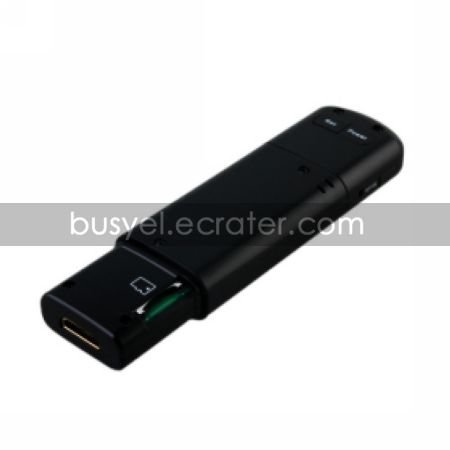
CMOS Spy Camera Digital Video Camera with HDMI out Supporting SDTF Card up to 32GB (YPY-424)


More than 10 available
Details
Shipping: Australia: free (more destinations)
Condition: Brand new
*The store has not been updated recently. You may want to contact the merchant to confirm the availability of the product.
HD 720P@30PFS 5.0MP CMOS Spy Camera Digital Video Camera with HDMI out Supporting SDTF Card up to 32GB (YPY-424)
Features
Under video mode
Press "power button" to turn on the machine. It defaults to enter the video mode.press "rec button" to start recirding, press"rec button" to stop recording
Under camera mode
Press "mode button" one time to enter camera mode. Press "mode button" to take a picture
Under playback mode
Connect the machine and HD TV with the HDMI cable. Press "mode button" two times from video mode to playback mode
Menu setting
Connect the machine and HD TV with the HDMI cable. Under any mode to press "mode button" until menu setting diagram shows up on the TV screen. Press "direction button" to select the item and press "mode button" to change the value then press "rec button" to set
Battery charging
Connect the machine and PC with the USB cable
Specification
5.0 CMOS sensor
Max 8 mega pixels by interpolation
H.264 1280*720p 30 fps MOV video file format
HDMI video output
Support Micro-SD or TF card up to 32GB
Power source: rechargeable battery
Warning: Do not use this product for any illegal purpose, otherwise you may be subject to prosecutions under applicable laws. You should be aware that we are obliged to provide the information in connection with your purchase of this product to relevant administrative and judicial authorities at their request.
Features
Under video mode
Press "power button" to turn on the machine. It defaults to enter the video mode.press "rec button" to start recirding, press"rec button" to stop recording
Under camera mode
Press "mode button" one time to enter camera mode. Press "mode button" to take a picture
Under playback mode
Connect the machine and HD TV with the HDMI cable. Press "mode button" two times from video mode to playback mode
Menu setting
Connect the machine and HD TV with the HDMI cable. Under any mode to press "mode button" until menu setting diagram shows up on the TV screen. Press "direction button" to select the item and press "mode button" to change the value then press "rec button" to set
Battery charging
Connect the machine and PC with the USB cable
Specification
5.0 CMOS sensor
Max 8 mega pixels by interpolation
H.264 1280*720p 30 fps MOV video file format
HDMI video output
Support Micro-SD or TF card up to 32GB
Power source: rechargeable battery
Warning: Do not use this product for any illegal purpose, otherwise you may be subject to prosecutions under applicable laws. You should be aware that we are obliged to provide the information in connection with your purchase of this product to relevant administrative and judicial authorities at their request.
You may also be interested in:
-
$503.57
-
$13.51
-
$146.81
-
$10.50
-
$13.51
-
$9.00
-
$55.95
-
$25.53
-
$34.96
-
$10.50


 CN, 21500
