
$343.13
Add to Cart
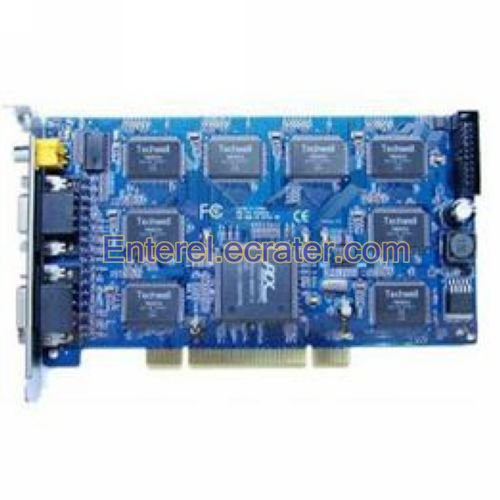
16 Channel H.264 TCP UDP DVR Boards Card VCC001


More than 10 available
Details
Shipping: Australia: free (more destinations)
Condition: Brand new
*The store has not been updated recently. You may want to contact the merchant to confirm the availability of the product.
Specifications:
* 8ch real-time or 8-16ch non real-time monitoring, and its image speed is two or three times of the other non real-time equivalent cards
* Each channel Image color can be adjusted independently by software
* Support insert 2 cards in the same PC at most, form 32 channel monitoring, and can also support mix inserting BV-6104B,BV-6204B,BV-6408B to form 32 channel monitoring
* Multi screen monitoring, 1, 4, 9, 16, 25, 32 split Screen available, support rotate display
* Support multi-hard disks cycle recording
* Recording both flow trends yard and fix yard are available
* Intelligent searching for historical DVR files, up to 16 screen playback
* Multi-user's authority management setup, support to set up user's operating authority
* Support motion detection touch off the video recording, sending alarm by phone, and by sound
* Setting up motion detection area discretionarily, the sensitivity is adjustable
* Through IE realize such perfect network management functions as remote spot monitoring, remote historical playback, remote spot video recording, remote historical video recording, etc
* Support Intranet IP to remote monitoring
* Support one IE remote monitors several DVR of different IP
* Support the watermark of the characters and time, the particular format of video files prevent being edited, the security is high
* The video file supports electron enlarge, taking pictures and instant print and exe format back up
* Support local and remote PTZ control
Details:
16 Channel H.264 TCP / UDP DVR Boards Card VCC001
* Multi screen monitoring, 1, 4, 9, 16, 25, 32 split Screen available, support rotate display
How to Select a Video Capture Card:
* Determine the type of PC expansion slot that you will plug your video capture card into your computer. The three major PC adapter interfaces for video capture cards are PCI, PCI-Express (or PCI-e), and USB. This is important because you will need to see which one will fit your PC. If you are not sure use the reference link at the end of this article to motherboards.org about PC Expansion Slots
* Determine the type of video format that the video capture card will be receiving. The two standard video formats are Standard Definition (SD) and High Definition (HD). Video capture cards vary in the types of definition as well as the format of HD content. Also some video capture cards do hardware encoding which formats the video content into PC readable files. Check if the video capture card is software or hardware encoding as this can affect your PC system resources such as CPU and Memory requirements
* Choose the number of tuners for the video capture card. Most of the early video capture cards could only capture one video source at a time. Now manufacturers sell dual tuners or multi-tuner video capture cards that allow more than one video source to capture per PC expansion slot
* Other media type considerations. Some video capture cards can take FM audio signals which allow to capture streaming audio. Also another consideration are remote controls that allow to change channels with your video capture card. Make an assessment of all of your requirements before purchasing
Package Included:
* 1 x Video Capture Card
* 8ch real-time or 8-16ch non real-time monitoring, and its image speed is two or three times of the other non real-time equivalent cards
* Each channel Image color can be adjusted independently by software
* Support insert 2 cards in the same PC at most, form 32 channel monitoring, and can also support mix inserting BV-6104B,BV-6204B,BV-6408B to form 32 channel monitoring
* Multi screen monitoring, 1, 4, 9, 16, 25, 32 split Screen available, support rotate display
* Support multi-hard disks cycle recording
* Recording both flow trends yard and fix yard are available
* Intelligent searching for historical DVR files, up to 16 screen playback
* Multi-user's authority management setup, support to set up user's operating authority
* Support motion detection touch off the video recording, sending alarm by phone, and by sound
* Setting up motion detection area discretionarily, the sensitivity is adjustable
* Through IE realize such perfect network management functions as remote spot monitoring, remote historical playback, remote spot video recording, remote historical video recording, etc
* Support Intranet IP to remote monitoring
* Support one IE remote monitors several DVR of different IP
* Support the watermark of the characters and time, the particular format of video files prevent being edited, the security is high
* The video file supports electron enlarge, taking pictures and instant print and exe format back up
* Support local and remote PTZ control
Details:
16 Channel H.264 TCP / UDP DVR Boards Card VCC001
* Multi screen monitoring, 1, 4, 9, 16, 25, 32 split Screen available, support rotate display
How to Select a Video Capture Card:
* Determine the type of PC expansion slot that you will plug your video capture card into your computer. The three major PC adapter interfaces for video capture cards are PCI, PCI-Express (or PCI-e), and USB. This is important because you will need to see which one will fit your PC. If you are not sure use the reference link at the end of this article to motherboards.org about PC Expansion Slots
* Determine the type of video format that the video capture card will be receiving. The two standard video formats are Standard Definition (SD) and High Definition (HD). Video capture cards vary in the types of definition as well as the format of HD content. Also some video capture cards do hardware encoding which formats the video content into PC readable files. Check if the video capture card is software or hardware encoding as this can affect your PC system resources such as CPU and Memory requirements
* Choose the number of tuners for the video capture card. Most of the early video capture cards could only capture one video source at a time. Now manufacturers sell dual tuners or multi-tuner video capture cards that allow more than one video source to capture per PC expansion slot
* Other media type considerations. Some video capture cards can take FM audio signals which allow to capture streaming audio. Also another consideration are remote controls that allow to change channels with your video capture card. Make an assessment of all of your requirements before purchasing
Package Included:
* 1 x Video Capture Card
You may also be interested in:
-
$0.75
-
$0.75
-
$0.94
-
$1.88
-
$4.49

-
$19.52
-
$6.00
-
$16.73

-
$4.49
-
$4.49


 CN, Guangdong
